
GrackerAI PageLens
A Summarize button on your site. Readers land in ChatGPT, Claude or Gemini already asking about your page, which puts your pages into the answers your readers get.
It stays yours. PageLens isn’t part of your plan, so it keeps working for free, on as many pages as you like, after everything else stops.
Your monitoring stops when the plan does. Your AI visibility doesn’t have to.
What it does
| | |
|---|---|
| One tag, every page | Paste one script before </body>. A floating Summarize button appears across your site. |
| Your URL, inside the answer | Readers pick an engine and land there already asking about your page, with your prompt. |
| Nothing loads until they click | No requests and no tracking while a reader is just reading. |
It does not rank your page or promise a citation. It removes the friction between your page and the answer engine, and puts your framing in the prompt instead of whatever the reader would have typed.
What the reader sees
| Step | What happens | |---|---| | 1 | Reader is on your article | | 2 | A small Summarize button sits in the corner | | 3 | They click. Assistant logos appear | | 4 | They pick one, say ChatGPT | | 5 | ChatGPT opens with your prompt and your URL already written | | 6 | ChatGPT fetches your page and answers from it |
Six seconds. One click. Your content is the source in an AI conversation.
What it is not
| Not | Because | |---|---| | A chatbot | It answers nothing on your site | | An AI cost | No model runs. No tokens billed to you | | A middleman | It hands the reader to the assistant they already use |
Installation
One tag, before </body>:
<script src="https://cdn.gracker.ai/summarize.min.js" defer></script>That is the full install. Every option has a sensible default, so the bare tag is complete.
To configure it visually, go to Connectors → GrackerAI PageLens. Position, engines and appearance are on the left, with a live preview on the right, and Edit tag gives you the finished snippet to paste.
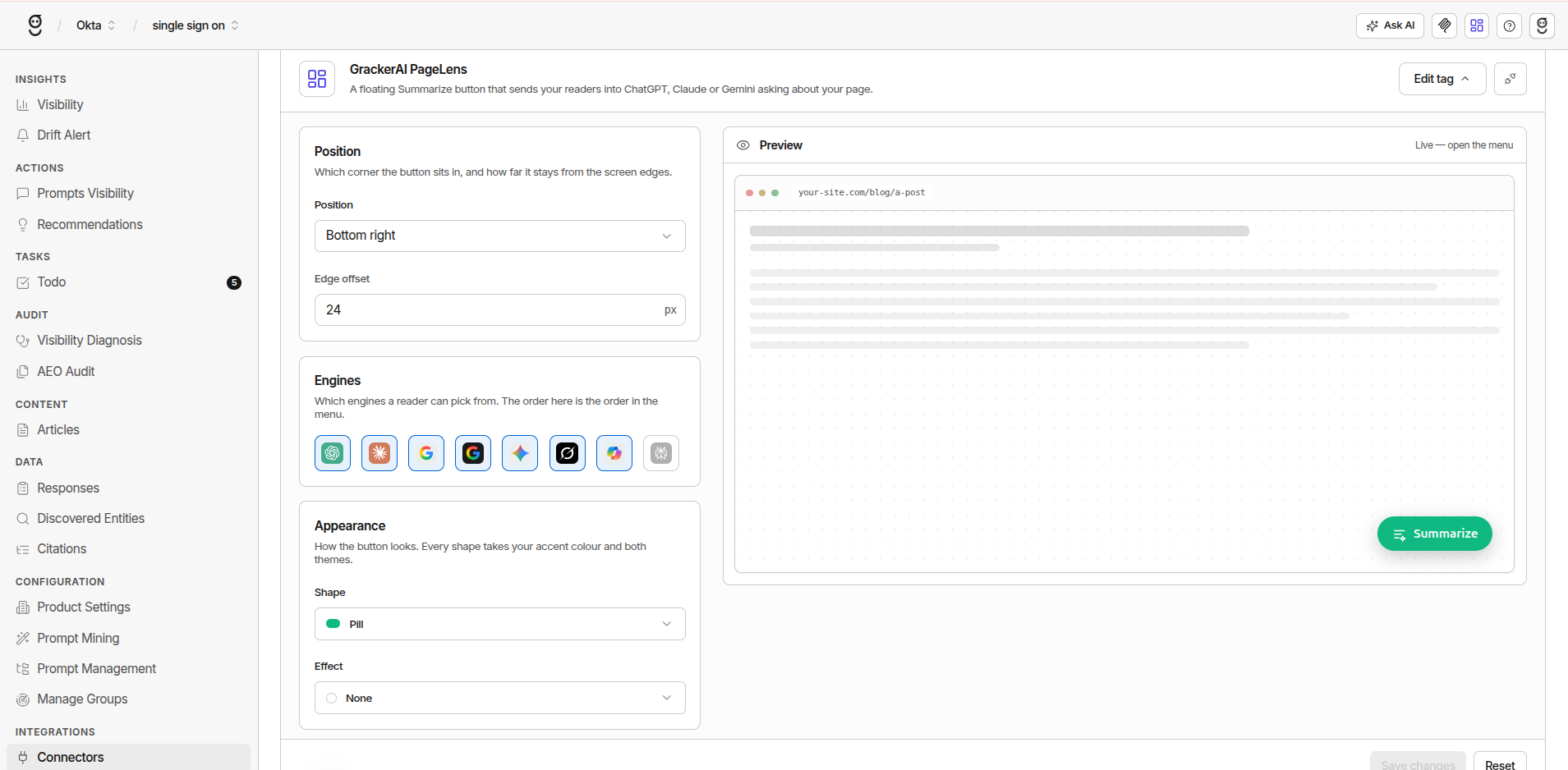
Engines you switch off are greyed out in the picker, which is why Perplexity appears dimmed until you enable it.
The snippet Gracker generates carries only what you changed:
<script src="https://cdn.gracker.ai/summarize.min.js"
        data-position="top-left"
        data-label="Ask AI"
        defer></script>
Defaults are omitted, so the tag stays short and what you see is what you configured.
Privacy and performance
While a reader is just reading:
| | | |---|---| | Network requests | None | | Cookies | None | | Tracking | None | | Third-party calls | None |
The widget renders inside a shadow root, so your site’s CSS cannot reach into it and its CSS cannot leak out. Provider logos are inlined as SVG, so it makes no requests of its own. The only request is the script tag itself. A click triggers an ordinary navigation carrying your URL and prompt.
Menu links are built lazily from the page address at the moment of interaction, so single-page apps get the correct URL with no re-mounting.
What this removes from review: no beacon to explain to your privacy team, no request to justify to your performance budget, nothing to add to a cookie banner.
Prompt configuration
The prompt decides what a click is worth. Most people leave it at the default.
| | |
|---|---|
| Default | Summarize this page in a few short bullet points, then list any key numbers or dates: {url} |
| Placeholders | {url} becomes the page address and {title} the page title, both at click time |
| Attribute | data-prompt |
Prompts by page type
A summary prompt on a pricing page wastes the click.
| Page type | Prompt | Result |
|---|---|---|
| Product | Explain what this product does, who it's for, and how it compares to alternatives: {url} | You are inside the comparison |
| Docs | Summarize this, then give me a working code example based on it: {url} | Your docs become shipped code |
| Research | Pull out the key findings and any statistics with their context: {url} | Your data quoted with attribution |
| Comparison | Summarize this and tell me which option fits a small team: {url} | You are in the decision moment |
| Pricing | Explain this pricing and which plan suits a 20-person team: {url} | Qualification without a sales call |
Supported assistants
Eight engines, set with data-providers as a comma-separated list. The list order is the menu order.
| Assistant | Key | Shown by default |
|---|---|---|
| ChatGPT | chatgpt | Yes |
| Claude | claude | Yes |
| Google AI Overview | aioverview | Yes |
| Google AI Mode | aimode | Yes |
| Gemini | gemini | Yes |
| Grok | grok | Yes |
| Copilot | copilot | Yes |
| Perplexity | perplexity | No, opt in |
Show fewer than you can. Seven options is a decision. Two is a click.
Appearance settings
| Setting | Attribute | Options | Default |
|---|---|---|---|
| Position | data-position | 8 anchors: top-left, top-center, top-right, middle-left, middle-right, bottom-left, bottom-center, bottom-right | bottom-right |
| Custom position | data-x / data-y | Any CSS length. Set both to override data-position | Not set |
| Offset | data-offset | Distance from the screen edges, for preset positions | 24px |
| Style | data-variant | pill, circle, ghost, glass, square, text | pill |
| Label | data-label | Button text. Kept as the aria-label when circle hides it | Summarize |
| Accent | data-accent | Any hex colour | #2563eb |
| Theme | data-theme | auto, light, dark | auto |
| Opens on | data-open-on | hover, click. Tap and keyboard always work either way | hover |
| Effect | data-effect | none, trail, radar, glow, shimmer, ring | none |
| Stacking | data-z-index | Stacking order of the widget’s host element | 2147483000 |
auto follows the reader’s system setting, so it is correct on dark-mode sites with no extra work.
Motion effects
Five effects stack on top of any style, each taking as many colours as you give it via data-fx-colors, at a thickness (data-fx-width, default 2px) and speed (data-fx-speed) you choose.
| Effect | What it is | Default speed |
|---|---|---|
| trail | Neon comet running the border | 3s |
| radar | Rotating beam with a tail | 2.2s |
| glow | Pulsing halo | 2.2s |
| shimmer | Highlight sweeping the edge | 2.6s |
| ring | Ring expanding outward, then gone | 1.9s |
Start at none. Add one only if the button is being missed. Every effect stops under prefers-reduced-motion: reduce.
Driving it yourself
Add data-manual to skip auto-mount and control the widget from your own code. The global is SummarizeThisPage:
<script src="https://cdn.gracker.ai/summarize.min.js" data-manual defer></script>
<script>
  const widget = SummarizeThisPage.mount({
    position: 'bottom-left',
    providers: 'chatgpt,claude',
    accent: '#111111'
  });

  // later
  widget.destroy();
</script>
mount(opts) takes the same keys as the data-* attributes in camelCase (openOn, fxColors, zIndex) and returns { el, destroy }. The module also exposes defaults, providers, svg(key) and providerUrl(key, url, title, prompt) if you want to build your own UI on top.
You can also self-host the script rather than loading it from cdn.gracker.ai. Keep summarize in the filename, or use data-manual, so auto-mount can still find its own tag.
Why it matters
Readers already do this
Pasting an article into an assistant is ordinary behaviour. It happens whether or not you enable it. The only question is whose tab it happens from.
| Reader leaves to ask | Outcome | |---|---| | Without PageLens | The assistant answers from training data and pages it chooses. Often a competitor’s. | | With PageLens | The assistant fetches your URL and answers from your content. |
The only lever that works on demand
| Approach | How the outcome arrives | |---|---| | Publishing, structure, earned citations | Indirect. Wait for a crawler, an index, a conclusion. | | PageLens | Direct. The moment a reader clicks. |
No adoption blockers
| Usual blocker | Why it does not apply | |---|---| | Performance review | Deferred script. Zero requests until click. | | Privacy review | No cookies. No tracking. No third-party calls. | | Engineering sprint | One tag. Ships via tag manager. | | Budget approval | Not part of your plan. Free, unlimited pages. |
Time to value is minutes. Most initiatives on this channel take a quarter.
Highest-return content
| Content type | Why | |---|---| | Documentation | Readers use assistants to turn docs into working code | | Long-form research | Nobody reads 4,000 words. They summarise it. | | Comparison pages | A reader comparing options is at the buying stage | | Product pages | The prompt can position you against alternatives directly |
Best practices
| Practice | Reason |
|---|---|
| Write the prompt for the page’s job | This is where the return lives |
| Cut the assistant list to two or three | Fewer choices, more clicks |
| Test the label | Ask AI promises a conversation. Summarize promises a chore. |
| Vary the prompt by template | Docs, product and comparison pages need different questions |
| Check mobile placement | Watch for collisions with chat widgets and cookie banners |
Summary
One script tag turns a common reader habit into a distribution channel.
| | | |---|---| | Cost to run | None | | Review needed | None. No performance or privacy surface | | Time to install | Minutes | | What it produces | Your page, inside an AI conversation, as the source being read |
FAQ
Does it slow my site down?
No. The script is deferred, and it makes zero requests of its own. Nothing loads until a reader clicks.
Do I need a cookie banner for it?
It sets no cookies, uses no storage, and sends no requests while a reader is reading, so there is nothing to consent to before a click. Confirm with your own counsel as you would for any third-party script.
How many pages can I use it on?
All of them. One site-wide tag, no limit, and no limit on the number of sites either.
Is it included in my plan?
No, and that is deliberate. It is not plan-gated, metered or seat-limited, and it keeps working after a GrackerAI plan ends. You do not need an account to use it.
Can I use different prompts per page?
The tag carries one prompt, so emit it from your template with a different data-prompt per page type. Docs, pricing and comparison pages each deserve their own question.
What if a reader never clicks?
They see a small button. Nothing loads, nothing is tracked, and nothing is sent anywhere.
Why isn’t Perplexity showing in my menu?
Perplexity is the one engine that is off by default. Add it explicitly with data-providers, listing every engine you want in the order you want them shown.
Will it clash with my site’s CSS?
No. The widget renders inside a shadow root, so your styles cannot reach into it and its styles cannot leak out. If it sits under another floating element, raise data-z-index.
Does it work in a single-page app?
Yes. Menu links are built at the moment of interaction from the current page address and title, so route changes are picked up without re-mounting the widget.
Can I change settings later?
Yes. Update them in Gracker and replace the tag. Most changes are a single attribute.







