
Prospect Reports
A full AI-visibility report on any company, built from their domain alone. No access, no setup, no involvement from them.
What it is
| | | |---|---| | What you provide | A domain | | What you get | Where that company appears when buyers ask AI assistants about their market | | What’s needed from them | Nothing. No access, credentials, analytics, or meeting | | Where the data comes from | Public AI answers about their category |
Most sales tools tell a prospect about your product. This tells them something specific and checkable about their business, and they can verify it on the spot by opening ChatGPT during the call.
What’s in a report
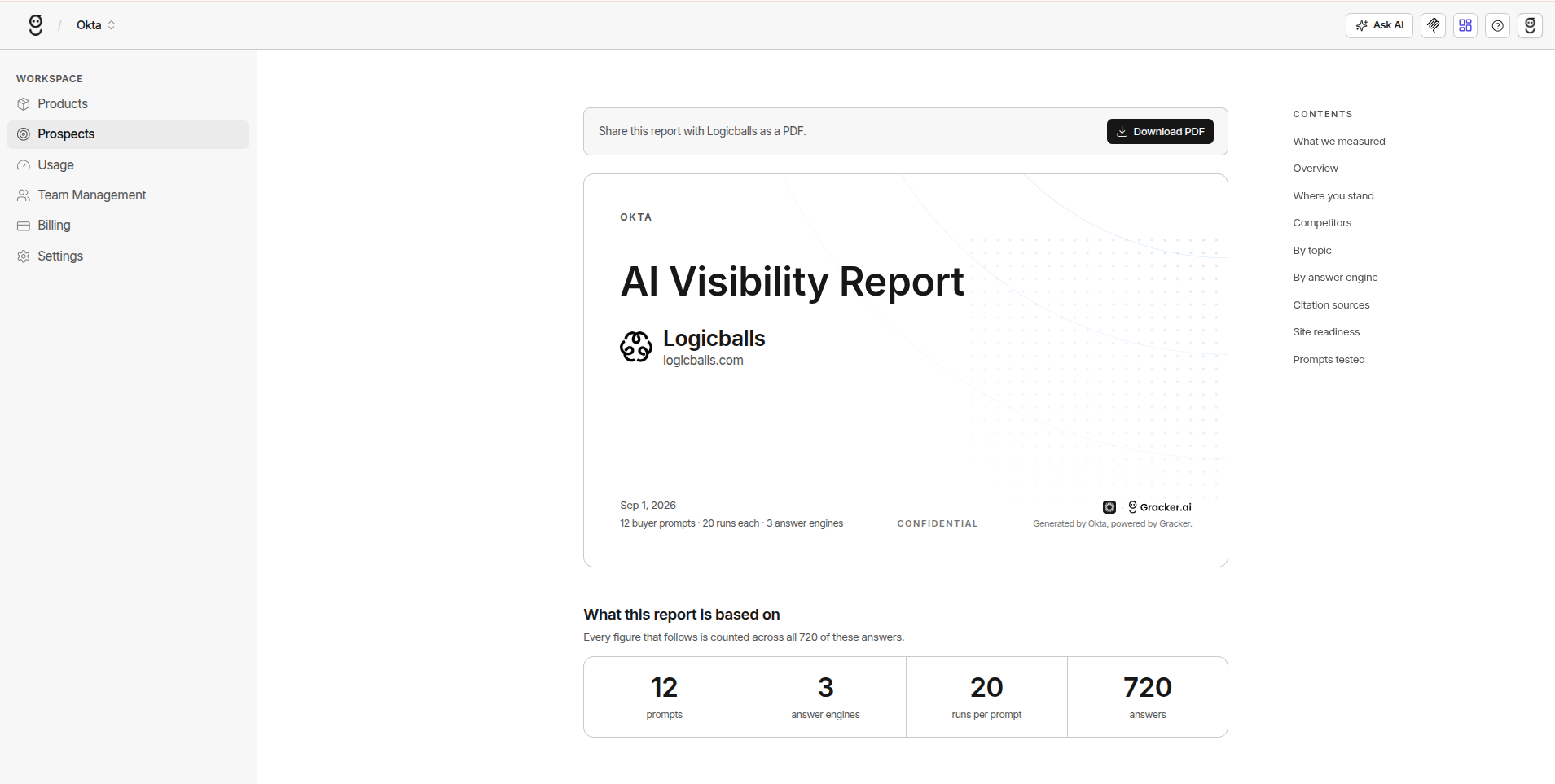
The finished report opens on a cover page carrying your agency’s name, the prospect’s brand and domain, the date, and the shape of the run: 12 buyer prompts, each run 20 times, on each answer engine you picked (3 by default), with competitors measured alongside.
Then it works through these sections:
| Section | Contents | |---|---| | What we measured | The prompts, engines and run counts every figure that follows is derived from | | Overview | The headline picture of where they stand | | Where you stand | Their visibility, expressed against the market rather than in isolation | | Competitors | Companies AI assistants actually name in that market, not a list you supplied | | By topic | Share of voice in each topic of their market, so you see where they show up and where they’re absent | | By answer engine | The same picture split per assistant, since engines disagree | | Citation sources | Which pages and domains the answers are actually drawing on | | Site readiness | How well their pages are set up to be cited in the first place | | Prompts tested | The full prompt set, so every number is traceable to a question |
Sections with nothing to report are dropped rather than shown empty, so a thin report stays short instead of padded.
Sharing it
The report is white-labelled to your agency: the cover reads “Generated by your agency, powered by Gracker”, and it is marked confidential.
Download PDF exports the whole thing to send to the prospect directly, which is usually how it reaches them before a first call.
Creating a report
- Open the workspace menu and choose Prospects
- Click New prospect report
- Fill in the form and click Generate
| Input | Required | Notes | |---|---|---| | Domain | Yes | The only research input needed | | Display name | No | Inferred from the domain if left blank | | Answer engines | Yes | ChatGPT, Google AI Mode and Google AI Overviews, all on by default. Pick at least one | | Country and Language | Yes | Default to United States and English (US). AI answers differ by market |
Prospect reports live in a separate prospects workspace with its own allowance, so speculative research never draws down what your clients are paying for.
The prospects list
Each prospect is a row showing Domain, Name, Status, and Last run. Clicking a row does nothing; use the ⋮ menu at the end of the row:
| Action | What it does | |---|---| | View report | Opens the finished report | | Refresh | Re-runs the prompts for an up-to-date report (see below) | | Convert to client | Moves the brand into one of your client workspaces | | Delete | Deletes the prospect and its report. You can generate a new report for the same domain afterwards |
Report phases
The Status column names the current phase. Keep the tab open while it runs; the report moves forward while the page is open.
A report that hits a problem lands in Failed rather than sitting half-built. Before it’s marked ready, the companies found in the answers are canonicalised.
Entity canonicalisation
“Acme”, “Acme Inc.” and “Acme Software” resolve to one company, not three.
Without this step, share-of-voice numbers are simply wrong, and wrong numbers in a pitch are worse than no numbers at all.
Refreshing a report
Choose Refresh from the row’s ⋮ menu. The prompts run again on the same engines and the report updates when they finish. A refresh runs once; it doesn’t put the prospect on a schedule.
Guards, all protecting spend:
| Guard | Behaviour | |---|---| | Ready first | Refresh is greyed out until the report is ready | | Cooldown | A refresh inside 7 days of the last run is declined, and you’re told how many days remain. AI answers don’t move day to day, so an early re-run costs credits for a near-identical result | | Credit check | The estimated cost (prompts × engines × countries) is checked before anything runs, so you’re told up front rather than mid-run |
Converting to a client
Choose Convert to client from the row’s ⋮ menu, pick a workspace under Select a workspace…, and click Convert. The brand moves into that workspace with its competitors, prompt set, monitor group and the answers already collected. The prospect report itself is removed from the Prospects list.
Three checks run before anything moves:
- The destination must be a real client workspace, not another prospects workspace.
- You must be a member of the destination.
- The destination’s brand limit is checked first, so a conversion that would exceed it is refused cleanly rather than half-completed.
It’s also refused if the destination already has a brand with the same name.
Why it matters
| Value | Mechanism | |---|---| | Pitch before first contact | Needs nothing from the prospect | | Evidence about them, not claims about you | The finding concerns their business and is verifiable in 30 seconds | | The pitch work becomes the onboarding | Brand, competitors and prompts survive conversion | | Speculative prospecting is cheap | Separate workspace and credit allowance: it costs credits, not analyst hours | | A reason to follow up | A refresh a few weeks later shows what changed while they waited |
Pitch before first contact
No discovery call, no access request, no waiting. Research a target list and open with a finding, instead of asking for a meeting in order to find something out.
This inverts the usual sequence. Most agencies need a conversation to produce insight. Here the insight earns the conversation.
Evidence, not claims
| Instead of | Say | |---|---| | “We help companies improve AI visibility” | “When buyers in your category ask about this, your competitor is named in most answers and you’re named in one. Here are the questions.” |
The competitor list is often the sharpest part of the report, because it reflects who assistants treat as an alternative, which is frequently not who the prospect believes they compete with.
The pitch work becomes the onboarding
The most underestimated benefit.
- The report already contains the brand, competitors, prompt set and monitoring setup.
- On conversion all of it moves across, so there is no rebuild in week one.
- The client’s first report can show the position measured before they signed, next to where they are now.
That baseline is the strongest retention artefact in the product, and it can only be captured before the work starts.
Refresh as follow-up
A prospect who stalls for two months and then sees “nothing improved while you waited, and your competitor gained” is a materially easier close than one looking at a stale snapshot. Refresh the report before the follow-up.
Best practices
| Practice | Why | |---|---| | Target domains with real market presence | A company nobody discusses produces a correct but uninteresting report | | Set country and language deliberately | A UK prospect measured on US answers surfaces competitors they don’t recognise, and one unrecognised name costs the whole report its credibility | | Read the enrichment before presenting | A wrong industry or niche invalidates everything downstream. Thirty seconds now beats finding out in the meeting | | Lead with the competitor, not the score | “You’re at 12%” is abstract. “They’re named in most answers, you’re named in one” is a problem with an owner | | Refresh for engaged prospects | A fresh run gives you a new reason to be in their inbox |
Summary
A prospect report turns a domain into a specific, verifiable conversation about that company’s position in AI answers.
- Nothing required from them
- No analyst hours spent
- Earns the meeting rather than needing one
- The work that won the account is the work you start the engagement with
FAQ
I can’t find Prospects in my workspace.
Prospect Reports is an Enterprise feature and is disabled on every plan by default, so the Prospects section is hidden until it is enabled for your workspace. Contact support to have it turned on. Once it is, Prospects appears in the workspace menu alongside your brands (or products), Usage, Team Management and Billing.
Does the prospect know we ran this?
No. Every input is public AI answers about their market. Nothing touches their site and nothing notifies them.
How accurate is competitor detection?
It reflects who assistants actually name in that market rather than a curated list, which is why it’s often the most useful part of the report. Names are canonicalised first, so one company appearing under three spellings is counted once.
Can I edit the generated prompts?
Not during the prospect stage. Once the brand is converted, the prompt set is fully editable like any other brand’s.
What if the report looks wrong?
Check the enrichment first, since industry and niche drive everything after them. A domain that resolves to a holding company or a parked page is the usual cause.
Do prospects consume client credits?
No. Prospect reports run in a separate prospects workspace with its own allowance.
Why was my refresh declined?
Most likely the seven-day cooldown, in which case you’re told how many days remain. A refresh is also declined if the report isn’t ready yet, if it has no prompts or no engines, or if the estimated cost would exceed the workspace’s remaining credits.
What happens to monitoring on conversion?
It becomes active as the brand moves into the client workspace, so data starts collecting straight away. If the destination plan can’t support that many monitored brands, monitoring is reconciled down to what the plan allows.
Can I convert into any workspace?
It has to be a real client workspace you’re a member of. Converting into another prospects workspace is refused, and so is a conversion that would push the destination past its brand limit or clash with a brand name already there.







