What Are Breadcrumbs in SEO? Types, Best Practices, and Key Benefits for Marketers

Imagine you're exploring a massive library, wandering through endless shelves, and suddenly realizing you have no idea how you got to this particular section or how to find your way back. Frustrating, right? This is exactly the problem that breadcrumbs solve in the digital world of websites. Borrowed from the classic fairy tale of Hansel and Gretel, who cleverly left a trail of breadcrumbs to find their way home through a dense forest, website breadcrumbs serve a remarkably similar purpose. Just as those magical breadcrumbs guided two lost children, digital breadcrumbs guide users through the complex landscape of websites, ensuring they never feel lost or overwhelmed.
What Exactly Are Breadcrumbs?
In web design and SEO, breadcrumbs are a secondary navigation scheme that reveals a user's location within a website's hierarchy. Think of them as a GPS for your website – showing visitors exactly where they are, how they got there, and providing an easy path back to previous pages. They typically appear as a horizontal line of text near the top of a webpage, displaying the path from the homepage to the current page, separated by symbols like ">", "/", or "»". 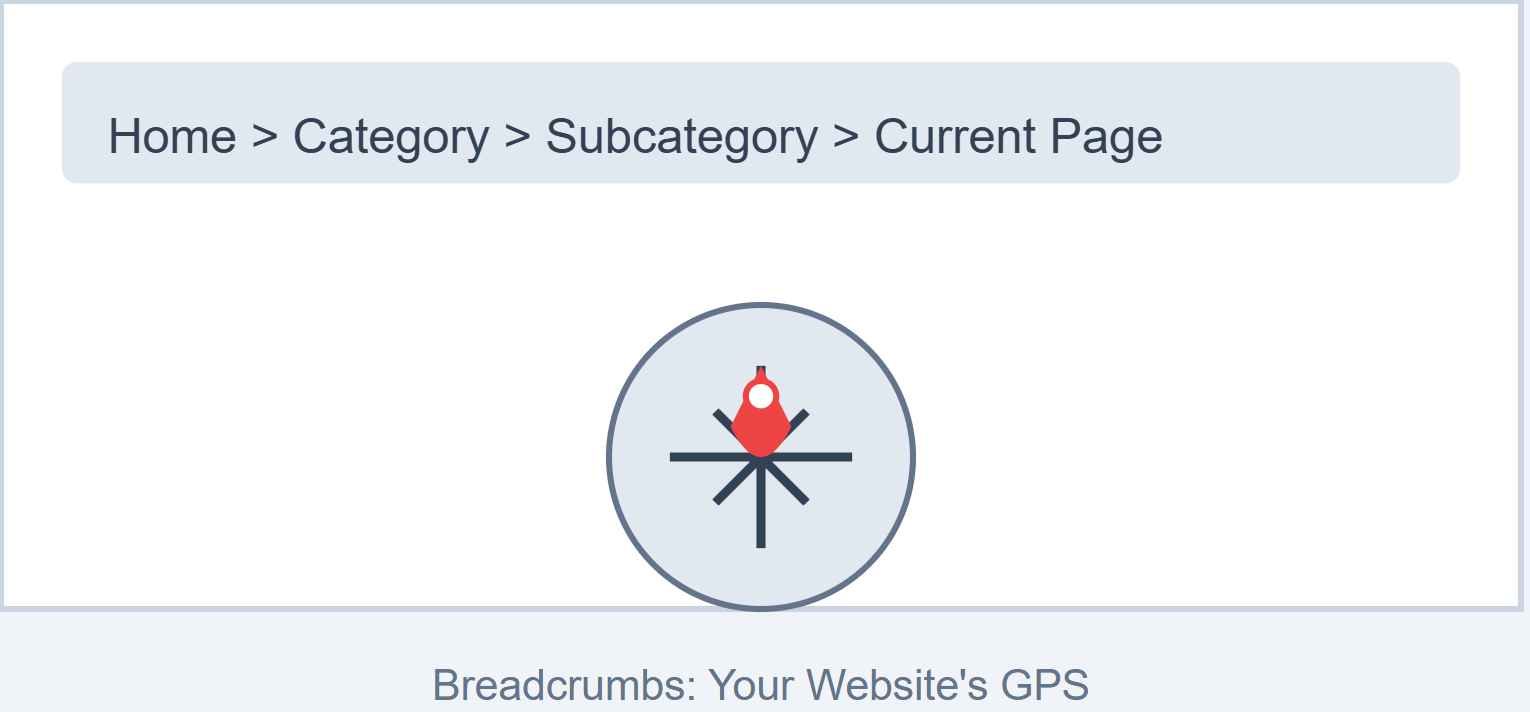
Why Breadcrumbs Matter in Modern Web Design
Breadcrumbs matter because they answer two audiences at once: visitors who need to know where they are, and search engines (and increasingly AI crawlers) that need a clear signal of how your pages relate to each other. On a site with more than a handful of pages, that dual signal is worth the small implementation cost. Here's why: 1. Instant Orientation: Users can immediately understand their current location within your site's structure. 2. Reduced Clicks: They provide quick alternative navigation, allowing users to jump to higher-level pages effortlessly. 3. SEO Boost: Search engines love clear site structures, and breadcrumbs help communicate your website's hierarchy more effectively. From e-commerce platforms to complex informational websites, breadcrumbs have become essential for creating intuitive, user-friendly digital experiences. They're the digital equivalent of those little trail markers hikers use – simple, unobtrusive, but incredibly helpful. In the following sections, we'll explore breadcrumbs, their types, implementation strategies, and the significant impact they can have on your website's usability and search engine performance.
What Are Breadcrumbs in SEO? - Technical definition
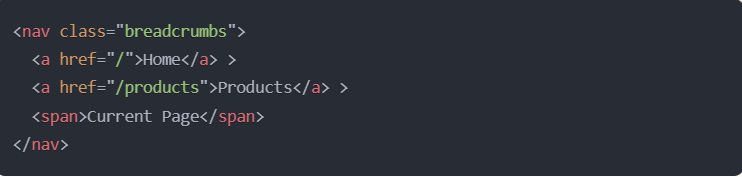
Breadcrumbs are secondary navigation systems implemented in website code that show the hierarchical path of a page using structured HTML elements, typically displayed as a horizontal series of clickable links separated by symbols (often ">" or "/"). In technical terms, they're a type of microdata that utilizes specific HTML markup and schema.org vocabulary to create machine-readable navigation paths. The basic HTML structure looks something like this: 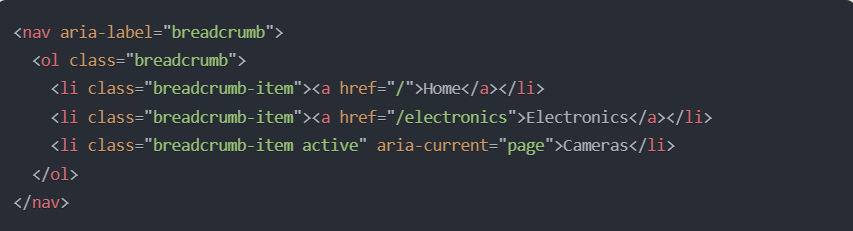
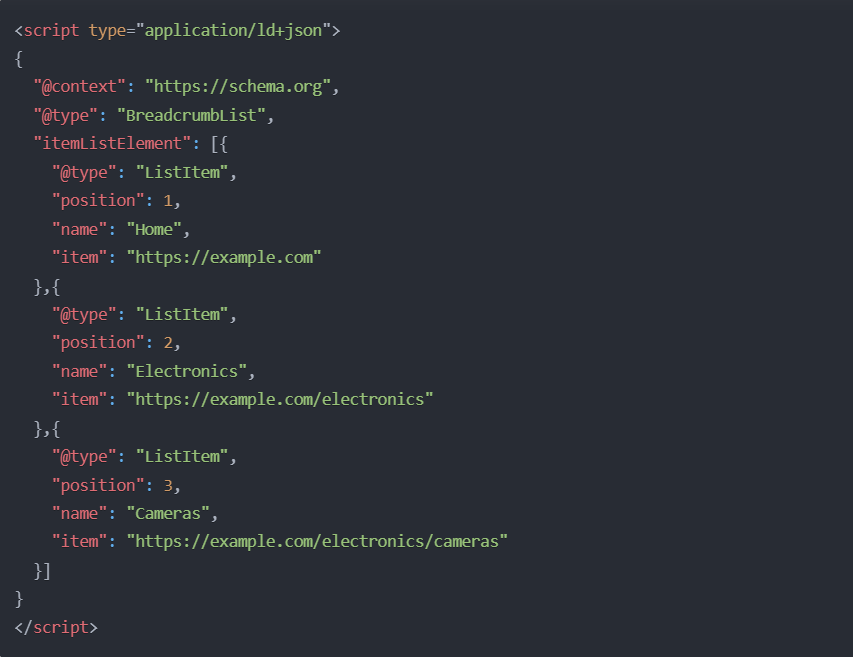 This structured data helps search engines:
Understand the relationship between pages
Identify the current page's position in your site hierarchy
Display enhanced breadcrumb navigation in search results
Better crawl and index your site's content structure
The technical implementation needs to follow web accessibility guidelines (WCAG), ensuring the navigation is usable by screen readers and keyboard navigation, while also maintaining proper semantic HTML structure for search engine parsing.
Do Breadcrumbs Matter for AI Search, Not Just Google?
Yes — BreadcrumbList structured data is a hierarchy signal, and hierarchy is exactly what AI answer engines need to place a page in context before citing it. Google's own developer documentation describes breadcrumbs as indicating "the page's position in the site hierarchy," recommending "breadcrumbs that represent a typical user path to a page, instead of mirroring the URL structure" (Google Search Central, Breadcrumb (BreadcrumbList) structured data, retrieved 2026-09-19).
That hierarchy signal does double duty. Classic search results use it to render the breadcrumb trail under your title instead of a raw URL. Retrieval-augmented AI systems — the pipelines behind ChatGPT, Perplexity, and Google AI Overviews — pull the same structured markup to understand where a page sits relative to the rest of your site before deciding whether it is a reliable, well-organized source worth citing. A flat, unstructured page competing against a clearly hierarchical one is at a disadvantage on both fronts.
This is a small piece of a larger discipline GrackerAI calls answer engine optimization (AEO) and generative engine optimization (GEO): structuring content so AI systems can parse, trust, and cite it, not just so Google can render a rich snippet. If you're already tracking which pages Google cites in rich results, our guide to schema markup for AEO covers the broader set of structured-data properties AI systems look for beyond breadcrumbs, and GrackerAI tracks whether that structured content is actually earning citations across engines.
Different Types of Breadcrumbs
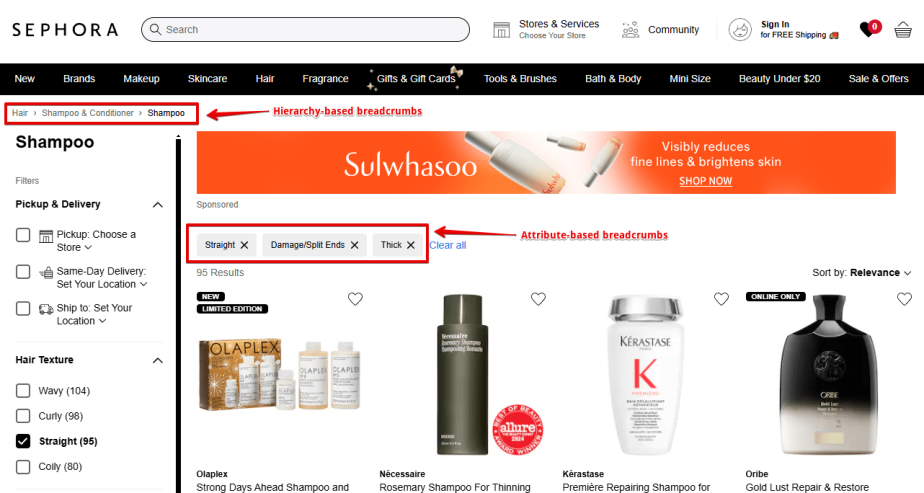
1. Hierarchy-Based Breadcrumbs
This is the most common type of breadcrumb, and we use it on our site too. It shows your position within the site’s structure and how many clicks it takes to get back to the homepage. For example Home > Blog > Category > Post Name. 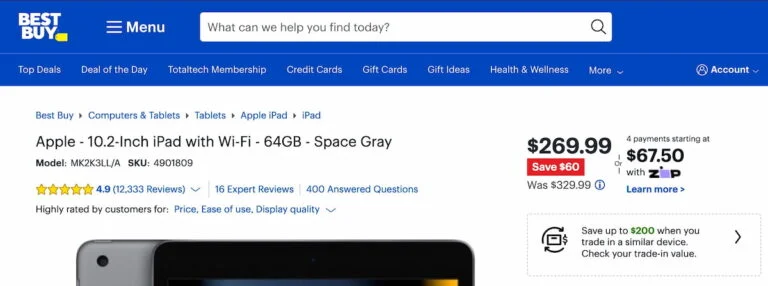
2. Attribute-Based Breadcrumbs
Imagine you're shopping for shoes online. Attribute-based breadcrumbs are like keeping track of all the choices you've made while filtering products. They show the path of characteristics or features you've selected, rather than just showing where you are in the website. For example, if you're on a clothing site, you might see something like: Men's > Shoes > Athletic > Size 10 > Black > Under $100 These breadcrumbs are super helpful in online stores and product catalogs. Here's why: Where You'll Usually Find Them
E-commerce websites (think Amazon or Nike)
Product comparison sites
Real estate listings
Travel booking sites (when filtering flights or hotels)
Car dealership websites
The Good Stuff:
Shoppers can easily see all their selected filters at once
Quick removal of individual filters without starting over
Perfect for sites with lots of product variations
Helps customers remember their search preferences
Makes comparison shopping much easier
The Tricky Parts:
Can get messy with too many attributes selected
Might confuse users who expect traditional navigation breadcrumbs
Can take up more space than regular breadcrumbs
Need careful planning to handle multiple filter combinations
Can be more complex to implement technically than other breadcrumb types
3. History-Based Breadcrumbs
Think of history-based breadcrumbs like your browser's "back" button, but way more visual and easier to use. They show you the exact path you've taken while clicking around a website. It's basically your personal trail of where you've been! For example, if you're browsing a news website, it might look like: Homepage > Sports News > NFL > Team Stats > Player Profile The cool thing is – this is YOUR unique path. Someone else might reach the same player profile through a completely different route, like: Homepage > Search Results > Player Profile When They Work Best:
On websites where people tend to explore a lot (like Wikipedia)
Research-heavy sites where users might want to backtrack
Educational platforms where students browse through different lessons
Large documentation sites where people hop between related topics
Sites with lots of interconnected content
But Here's Where Things Get Tricky:
They can get super confusing if you open multiple tabs
The path might not make sense if you landed on the page from Google
They don't work well if someone shares a URL with you (since it's based on someone else's journey)
They can get long if someone's been clicking around a lot
Refreshing the page might mess up the history
They take up more server resources than other types of breadcrumbs
Here's a real-world example: Imagine you're in a library, and instead of remembering which shelf a book came from, you're trying to remember all the other books you looked at before finding this one. That's kind of what history-based breadcrumbs do – they show your journey, not necessarily the organized layout of the site. I know some people who prefer these over regular breadcrumbs because they can retrace their exact steps. But for most websites, the traditional location-based breadcrumbs tend to work better. Have you ever used a site with history-based breadcrumbs? 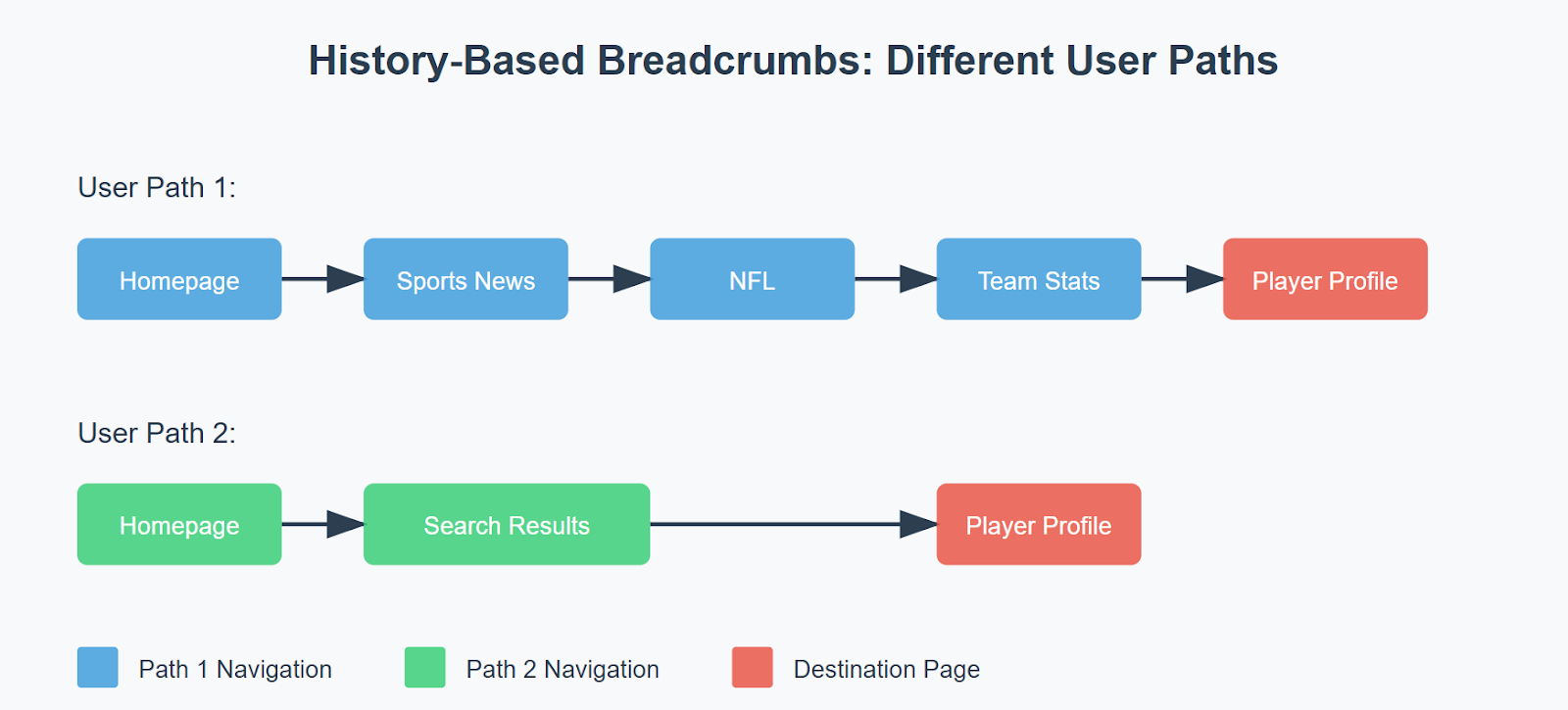
4. Path-based breadcrumbs
Think of path-based breadcrumbs as your footprints through a website. They show exactly which pages you clicked on to get where you are now. For example, if you're browsing a cooking website, your trail might look like this: Home > Quick Recipes > Pasta Dishes > Today's Popular > Spaghetti Carbonara Here's the thing though – these breadcrumbs aren't very popular anymore, and for good reasons:
Your browser's back button already does this job pretty well
If someone shares a link with you (like from Google or social media), you won't see their path – you'll just land directly on the page
It's kind of like if you took a shortcut to get to your friend's house – you wouldn't see all the turns they usually take to get there, right? That's why most websites today prefer to mix these with other types of breadcrumbs. Instead of just showing where you've been, they might also show you where you are in the website's overall structure. This way, you can either backtrack your steps OR jump to different sections that might interest you. 
Advantages of Using Breadcrumbs
For Your Visitors: Picture breadcrumbs as your website's friendly tour guide! They help people:
Never get lost while exploring your site (imagine having a GPS for every page!)
Find what they're looking for faster ("Oh, I can just click here to go back to all winter jackets!")
Understand exactly where they are (like those "You Are Here" dots on mall maps)
Feel more confident browsing around (because they can always find their way back)
For Search Engines (The SEO Magic): Here's where it gets really interesting for your website's visibility:
Google loves well-organized websites (breadcrumbs show exactly how your content is structured)
Each breadcrumb link helps Google understand your site better (it's like giving Google a roadmap)
Your search results look fancier with those neat little navigation paths showing up
Keywords in breadcrumbs can help you rank for terms like:
"best navigation structure examples"
"website hierarchy optimization"
"user-friendly navigation design"
"e-commerce site structure"
For Your Business Goals: The real-world benefits are pretty amazing:
People stick around longer (because they can easily find related stuff)
They view more pages (it's easier to jump between sections)
More people find what they want and buy stuff (especially on shopping sites)
Visitors discover more content naturally (like finding a cool article while browsing)
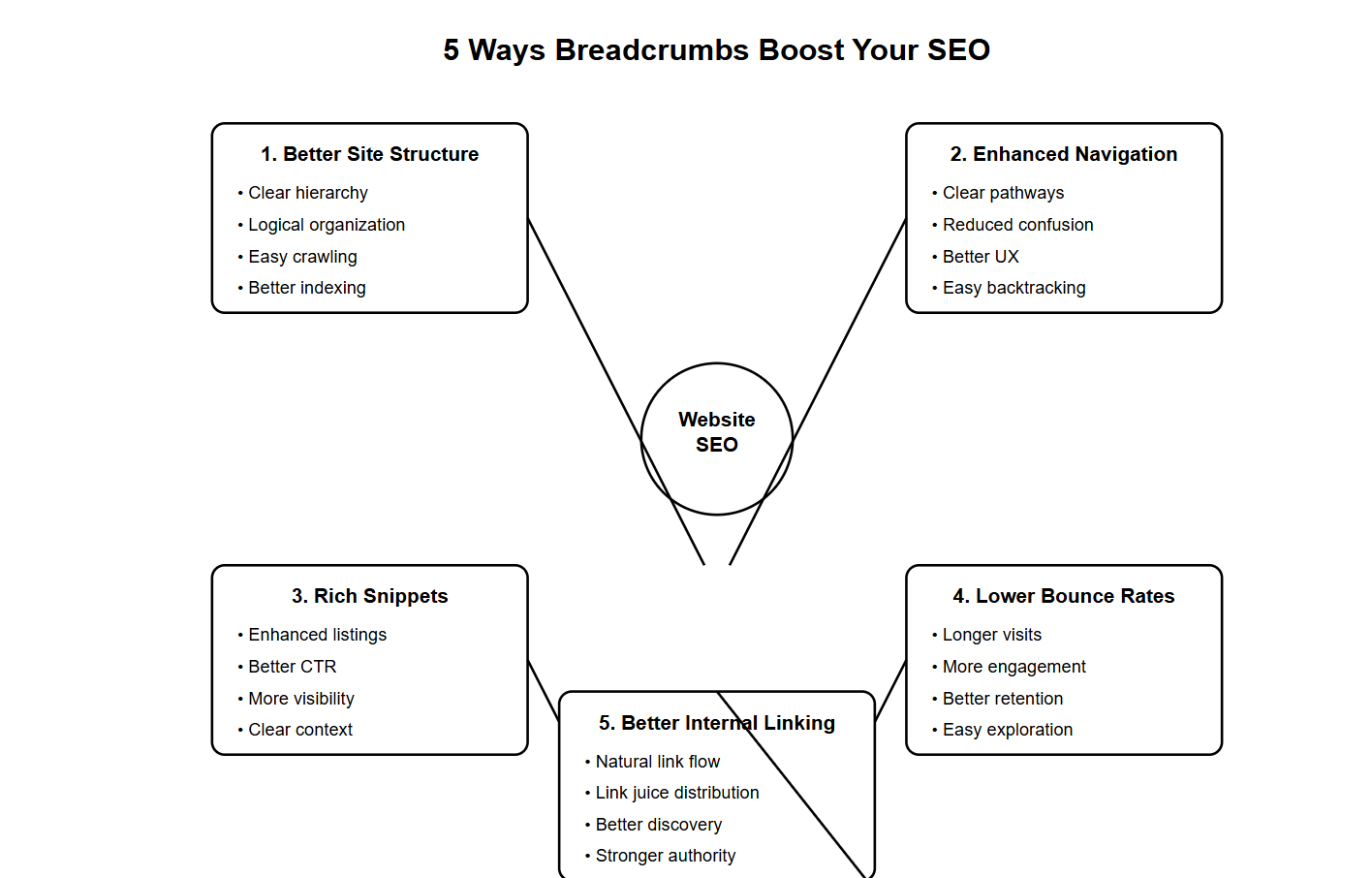
5 Ways Breadcrumbs Supercharge Your SEO
1. Better Site Structure
Makes your website architecture crystal clear
Helps search engines understand how your pages connect
Creates a logical hierarchy that Google loves
Example: Home > Blog > SEO Tips > Breadcrumbs Guide
2. Enhanced User Navigation
Makes it super easy for visitors to move around
Reduces confusion and frustration
Helps users know exactly where they are
Works like a GPS for your website
3. Improved Search Snippets
Shows your site structure in Google results
Makes your listings stand out
Increases click-through rates
Helps users understand your content before clicking
4. Lower Bounce Rates
Keeps visitors on your site longer
Makes it easy to explore related content
Encourages deeper site exploration
Example: If someone wants to change the category, they just click back instead of leaving
5. Better Internal Linking
Creates natural internal links
Spreads link juice throughout your site
Helps search engines discover new content
Strengthens your overall site authority
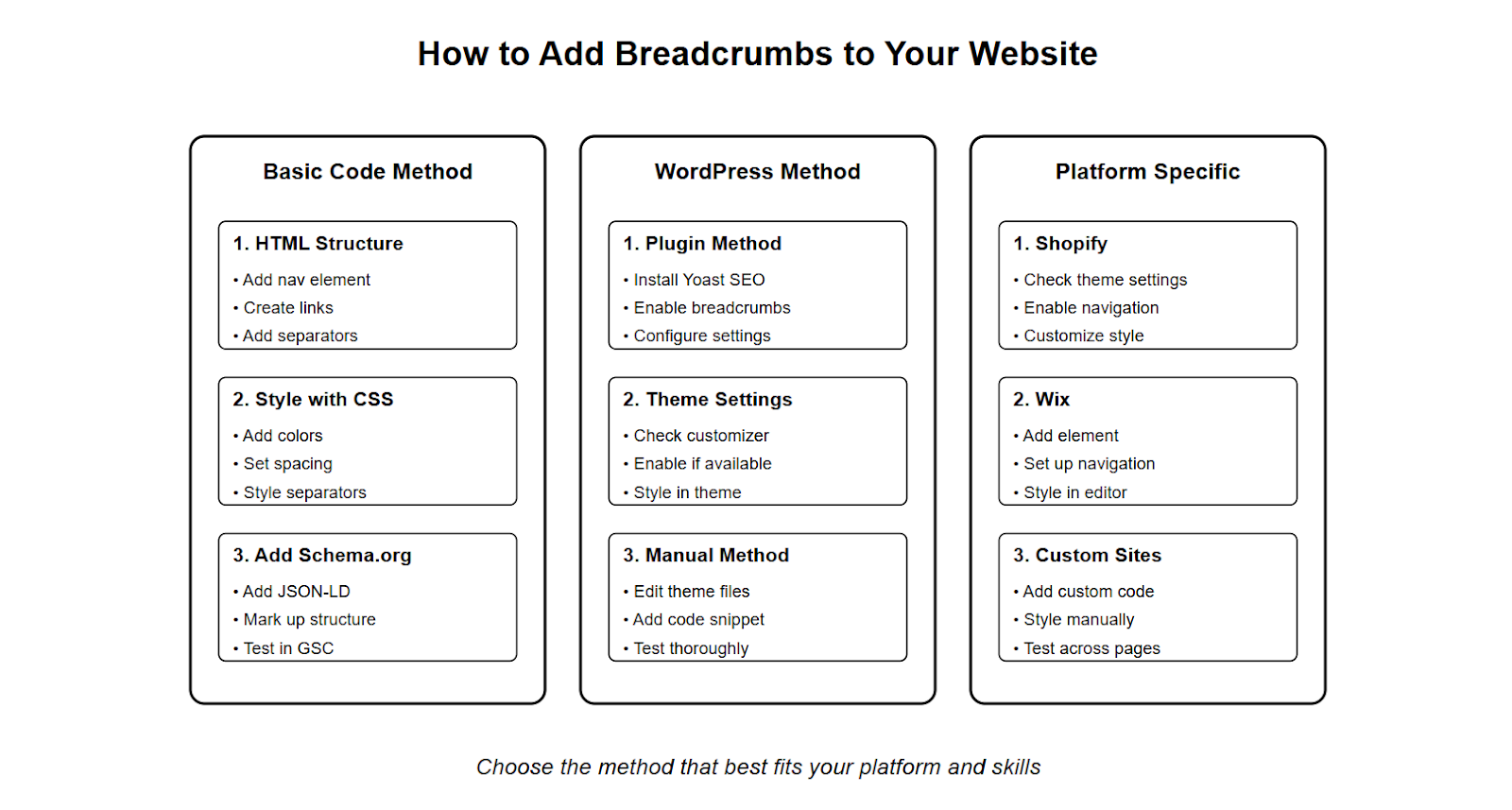
How to Add Breadcrumbs?
1. The Basic Method (HTML & Code)
- Simplest way: Use HTML and CSS
Add some JavaScript magic to make them dynamic
Use Schema.org markup to make Google happy
2. For WordPress Users
Easy Way: Use plugins like "Yoast SEO" or "Breadcrumb NavXT"
Theme Way: Check if your theme has built-in breadcrumbs
DIY Way: Add code to your theme files
3. For Online Store Platforms
Shopify: Usually built into themes (check settings)
Wix: Use the "Add Breadcrumbs" element
Custom Sites: Follow the code method above
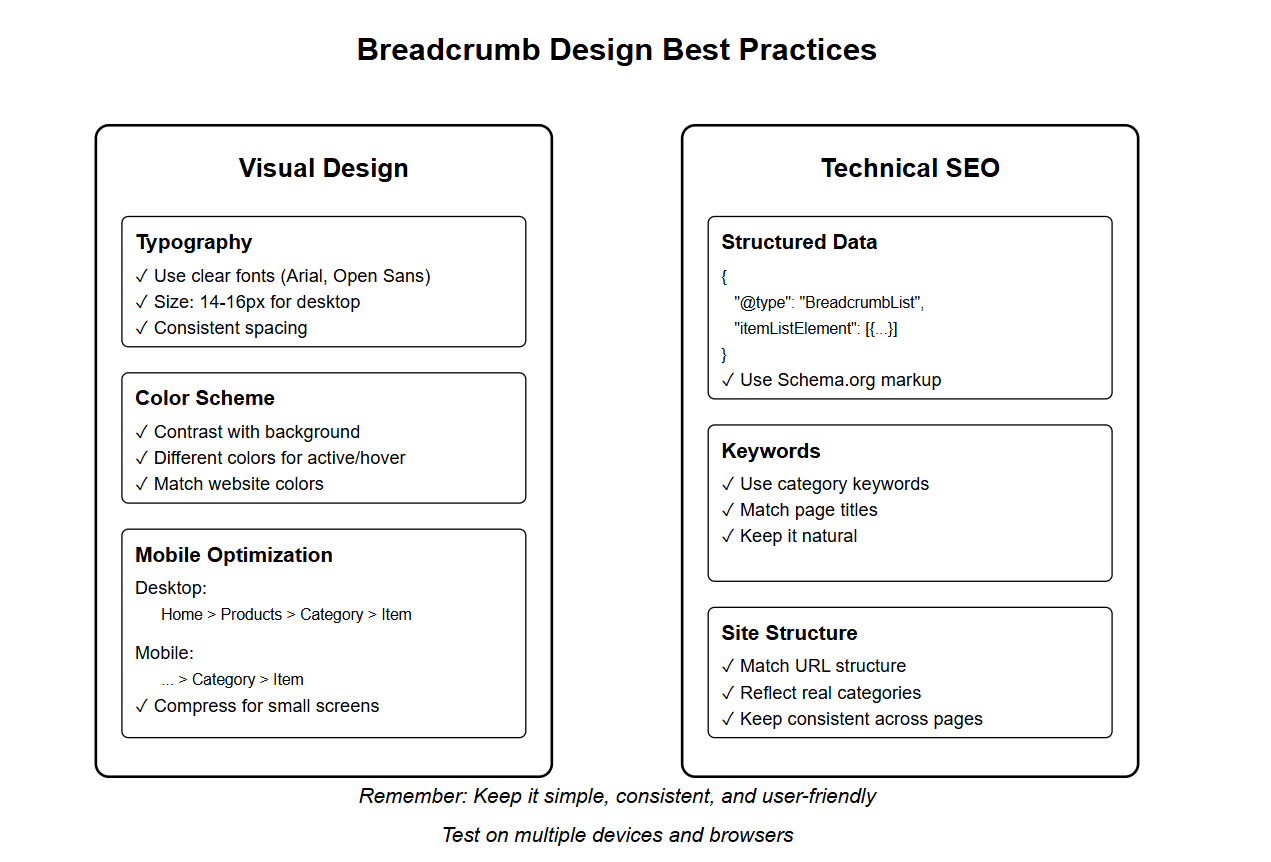
Best Practices for Breadcrumb Design
Making Your Breadcrumbs Look and Work Great
1. Making Them Look Good
Choose easy-to-read fonts (like Arial or Open Sans)
Use colors that stand out but don't shout
Make sure they look good on phones and tablets
Keep them neat at any screen size
2. Making Search Engines Happy
Add proper code that Google understands
Include relevant keywords naturally
Match your website's real structure
Keep everything consistent
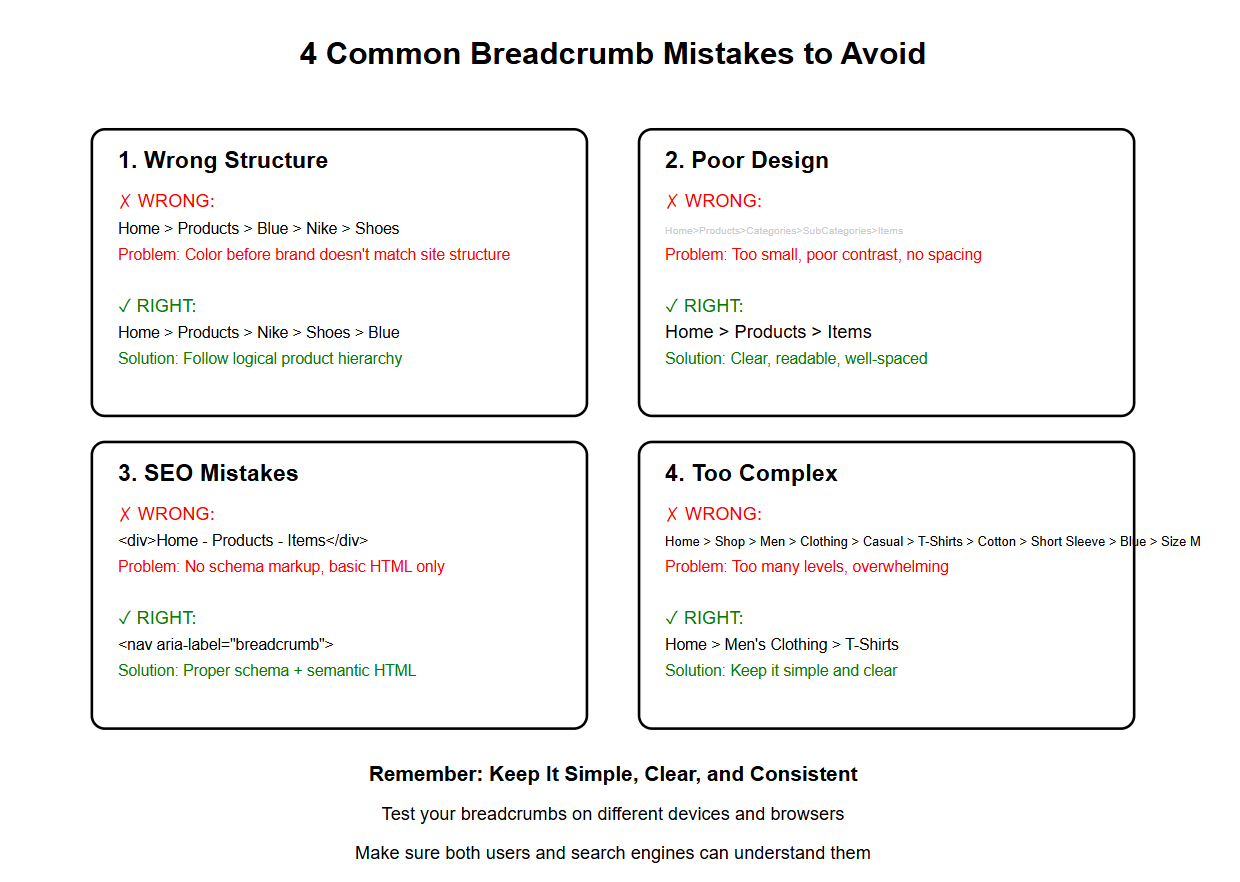
4 Common Mistakes When Using Breadcrumbs for SEO
Let me explain the common breadcrumb mistakes in a friendly, easy-to-understand way!
1. Getting the Structure Wrong
Like having a map that doesn't match your actual roads
Example of BAD structure: Home > Products > Shoes > Blue > Nike (when Nike isn't actually under Blue)
Example of GOOD structure: Home > Products > Nike > Shoes > Blue
2. Making Them Hard to Use
Tiny text that's impossible to read
Colors that blend into the background
Breadcrumbs that get squished on mobile phones
Too many clicks are needed to get somewhere
3. Messing Up the SEO Part
Forgetting to add the special code Google needs
Using the wrong type of markup
Having the same breadcrumbs on different pages
Not telling search engines what's what
4. Making Things Too Complicated
Having too many levels (Home > Category > Subcategory > Sub-subcategory > Product Type > Brand > Color > Size)
Confusing visitors with too many choices
Creating paths that lead nowhere
Examples Where Breadcrumbs Don't Work
Let me explain in a friendly, conversational way when breadcrumbs might not be the best choice for your website. Let's talk about situations where breadcrumbs might actually cause more confusion than help!
Single-Page Websites
Think about those trendy one-page websites where everything smoothly scrolls from top to bottom. Adding breadcrumbs here would be like putting street signs in your living room – they just don't make sense! These sites usually work better with a simple menu that jumps to different sections, or even better, a "scroll to top" button that pops up as you move down the page. Besides, since everything's on one page, there's no real "trail" for visitors to follow anyway.
Minimal Navigation Sites
Remember those clean, artistic portfolio websites or simple landing pages? These are designed to be straightforward and elegant. Adding breadcrumbs here would be like wearing a tuxedo to the beach – it's just too much! These sites work better with subtle navigation cues like menu icons or simple back buttons. The goal is to keep visitors focused on the content without distracting them with unnecessary navigation elements.
Flat Website Structures
Picture a website where everything's just one click away from the homepage – like a simple blog or a basic business site. Adding breadcrumbs here would be like having a GPS for your backyard. When all your content is easily accessible from the main menu, breadcrumbs just add clutter without providing real value. These sites are better served by clear menu structures and maybe a good search function. 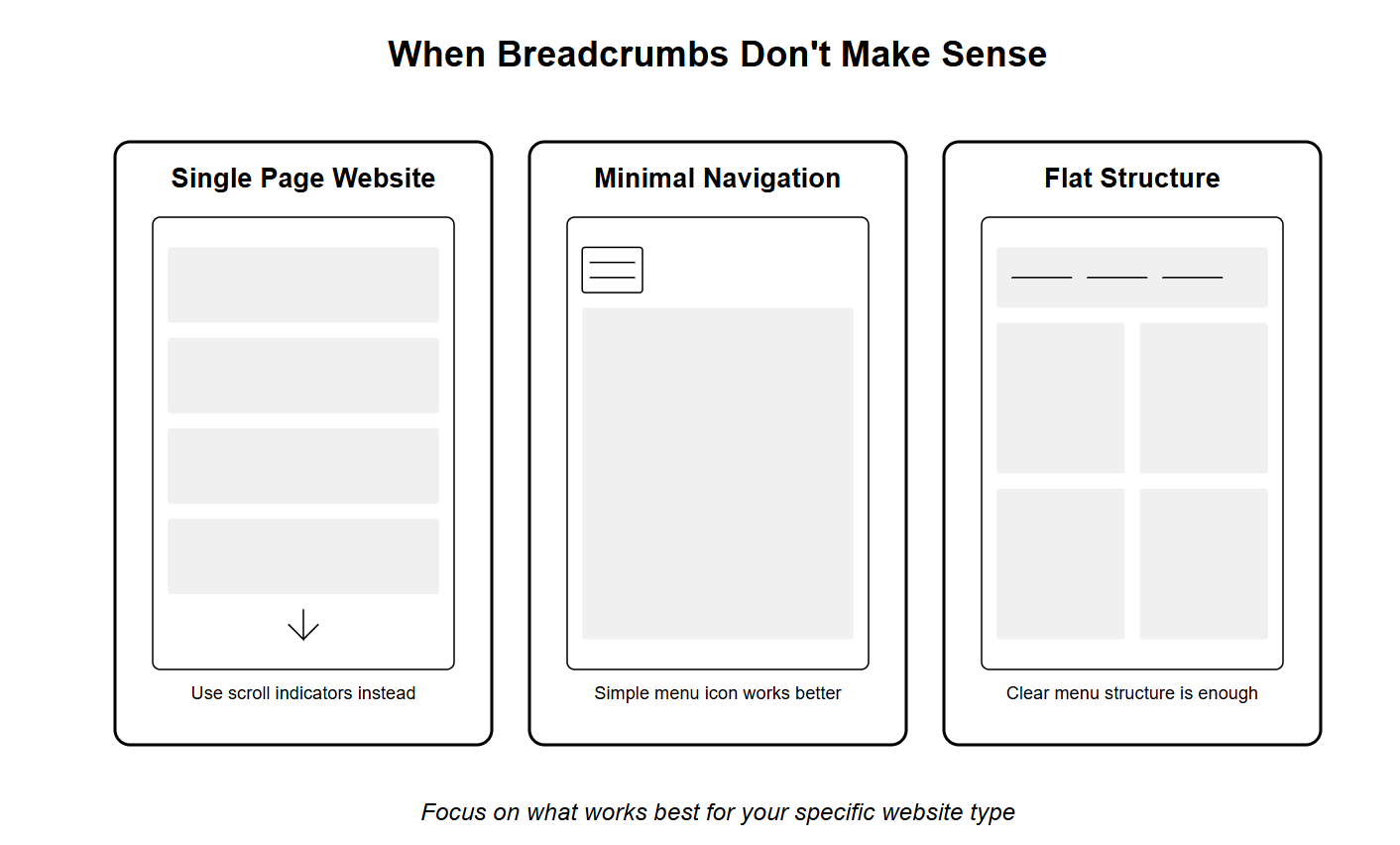
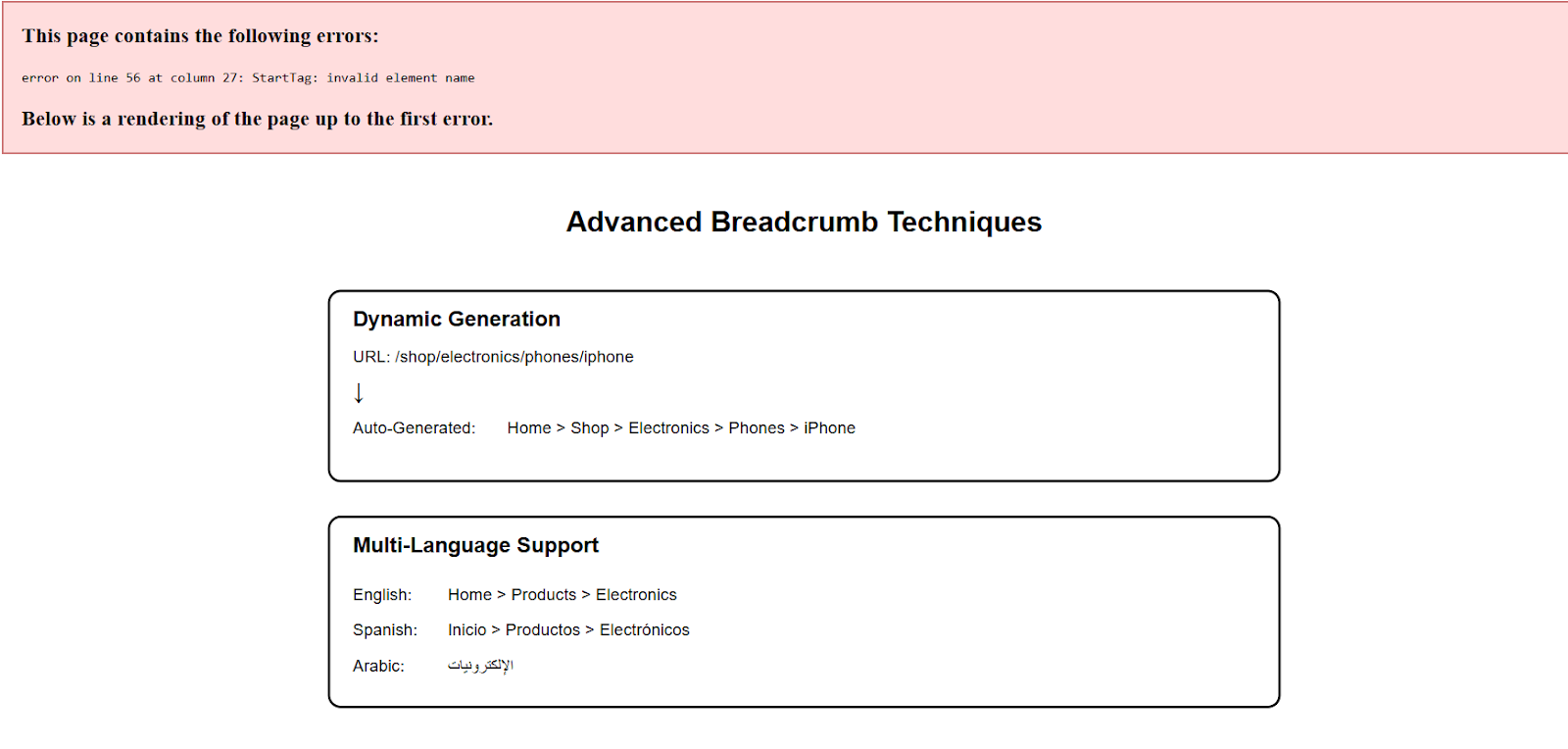
Advanced Breadcrumb Techniques
Making Breadcrumbs Work Automatically
Imagine having a smart assistant that creates your breadcrumbs for you! That's what dynamic breadcrumbs do. Instead of manually adding them to each page, your website can create them automatically based on how your pages are organized. It's like having a GPS that always knows where you are on your site and shows visitors the perfect path back.
Making Breadcrumbs Speak Multiple Languages
When your website speaks different languages, your breadcrumbs need to speak them too! This means thinking about how different languages work - for example, some read right-to-left, others use different separators, and words can be much longer or shorter in different languages. It's like making sure your road signs make sense no matter what language you speak.
Making Breadcrumbs Super Fast
Nobody likes waiting for pages to load! Fast breadcrumbs mean happy visitors. This involves clever tricks like:
Storing breadcrumb information so it loads quickly
Making sure they don't slow down your page
Using smart coding to keep everything speedy
Tools and Resources
Handy Tools for Better Breadcrumbs
Think of these tools as your breadcrumb toolkit - they help make sure your website's navigation is working perfectly! Let's break down what each tool does and how it helps:
Tools for Getting SEO Right
Google's tools are like having a website doctor - they check if your breadcrumbs are healthy for search engines! The Schema Markup Generator is like a translator that helps Google understand your site better. And if you're using WordPress, there are plugins that do all the hard work for you.
Tools for Making Things Fast
These are like speedometers for your website. Google Search Console shows you how your breadcrumbs look in search results, PageSpeed Insights tells you if they're slowing down your site, and validation tools make sure everything's working correctly. 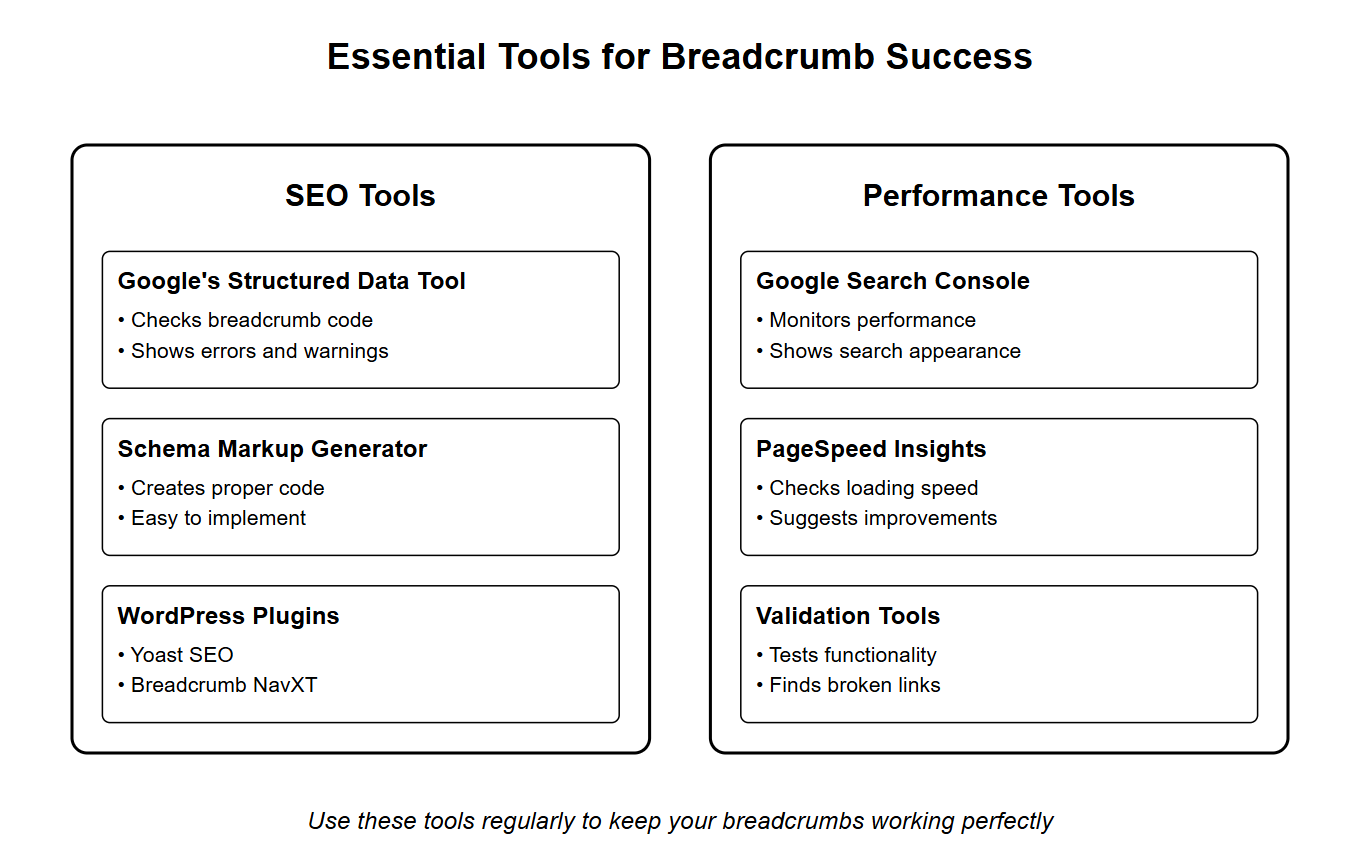
Frequently Asked Questions
Do breadcrumbs directly improve Google rankings?
Not directly. Google has never listed breadcrumbs as a ranking factor, but they reduce bounce rate, improve crawl efficiency, and can produce a cleaner result in search snippets, all of which support ranking performance indirectly.
Which breadcrumb type should most websites use?
Hierarchy-based breadcrumbs (Home > Category > Page) cover the vast majority of sites, including most B2B and content sites. Attribute-based breadcrumbs are for filtered e-commerce catalogs specifically, and history-based breadcrumbs are rarely worth the added complexity.
Do single-page sites need breadcrumbs?
No. A single-page site or a minimal landing page has no hierarchy to signal, so breadcrumbs add clutter without benefit. Save them for sites with real depth — blogs, documentation, product catalogs.
Does BreadcrumbList schema help with AI search visibility?
It helps indirectly, by making page hierarchy explicit and machine-readable, which is the kind of structural clarity retrieval systems favor when selecting a source to cite. It is one input among many, not a guarantee of citation.
What's the easiest way to add breadcrumb schema without coding it by hand?
Most CMS platforms and SEO plugins (Yoast SEO, Breadcrumb NavXT on WordPress; built-in theme support on Shopify) generate valid BreadcrumbList markup automatically. Validate the output with Google's Rich Results Test before relying on it.
Conclusion: Making the Most of Breadcrumbs for Better SEO and User Experience
Breadcrumbs have evolved from a simple navigation tool to a crucial element in modern web design and SEO strategy. As we've explored throughout this guide, when implemented correctly, breadcrumbs can significantly enhance both user experience and search engine visibility.
Key Takeaways:
Breadcrumbs serve as a powerful navigation aid, helping users understand their location within your website's hierarchy
They improve SEO by providing clear site structure signals to search engines
Different types (hierarchy-based, attribute-based, and history-based) serve different purposes
Proper implementation requires attention to technical details and user experience principles
Not all websites need breadcrumbs – consider your site's structure and user needs
Remember, successful breadcrumb implementation isn't just about following technical guidelines; it's about creating an intuitive user experience that naturally guides visitors through your content while supporting your SEO goals. Whether you're running an e-commerce platform, content-rich website, or business site, breadcrumbs can be a valuable addition to your navigation strategy – just ensure they align with your site's structure and user needs.
Ready to Implement? Start with the basics:
Choose the right type of breadcrumbs for your site
Follow technical best practices and SEO guidelines
Regularly test and optimize your implementation
Use the recommended tools to monitor performance
By following the guidelines and avoiding common pitfalls outlined in this guide, you can create an effective breadcrumb navigation system that enhances both user experience and SEO performance.
![10 Best Local Rank Tracker Tools: In-Depth Comparison Guide [2025]](https://cdn.pseo.one/6abcb68a626591c40e1c8aa6/687e1c1ef6fe799d288518df/68809c373eb8562bcf68975d/10-best-local-rank-tracker-tools-comparison-guide/feature-image.jpg)