Unlock SEO Success: Everything You Need to Know About URL Canonicalization

Ankit Agarwal · Head of Marketing
· Updated September 19, 2026

URL canonicalization is telling search engines which version of a page is the “main” one to index and rank when the same or near-identical content is reachable at more than one URL. Without it, search engines have to guess which version matters, which can split ranking signals across duplicates instead of concentrating them on one page. This guide covers what canonicalization is, how to implement it correctly, and how it applies to both traditional search and the AI-driven search surfaces now reading the same pages.
Whether you’re experienced with technical SEO or just starting out, canonical tags are one of the highest-leverage, lowest-effort fixes available — most sites have duplicate-URL problems they don’t know about until they audit for them.
What is Canonicalization?
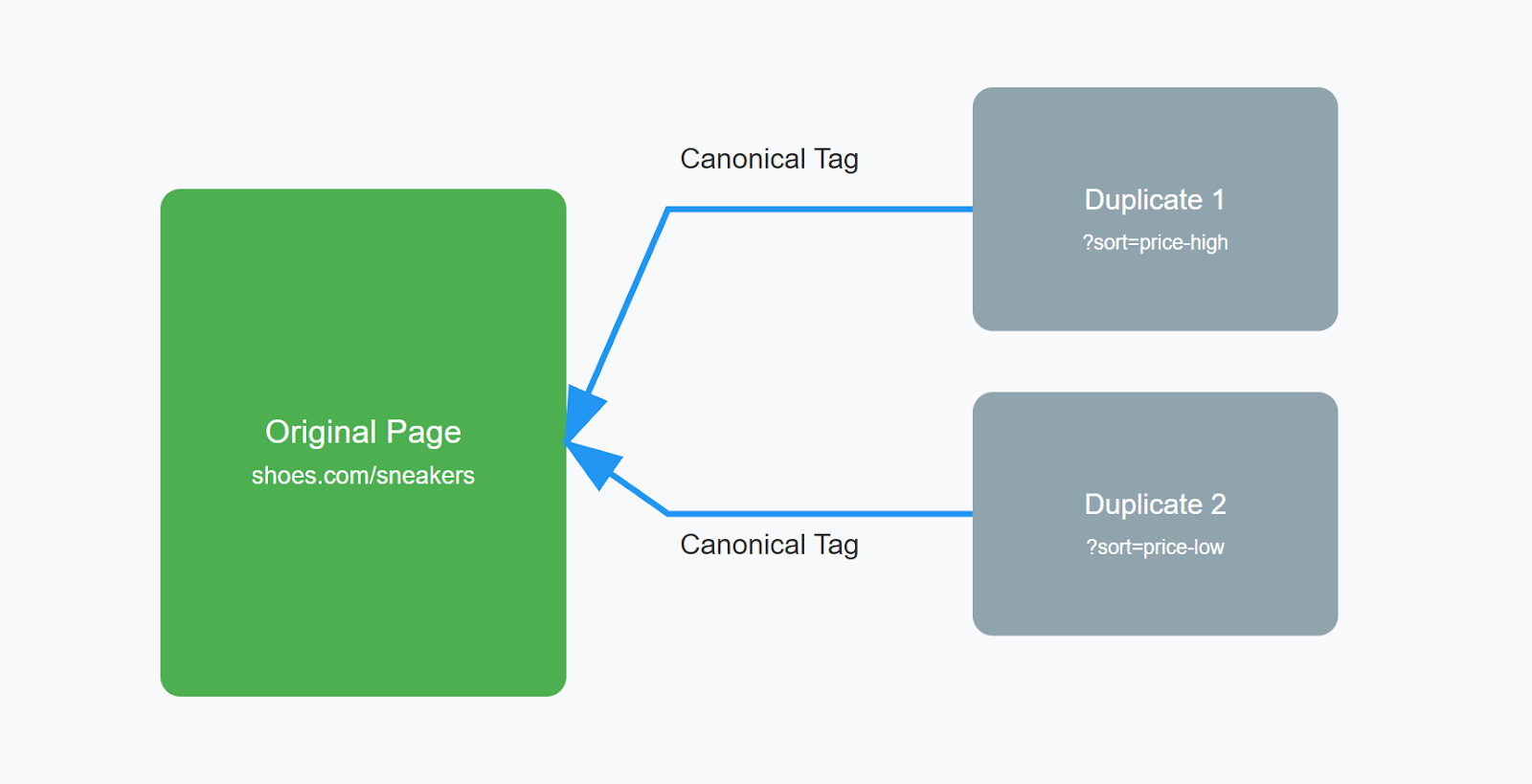
When you have a website, sometimes the same content appears on different web addresses (URLs). This happens a lot with online stores. For example:
-
shoes.com/sneakers (shows all sneakers)
-
shoes.com/sneakers?price=high (same sneakers, sorted by highest price)
-
shoes.com/sneakers?price=low (same sneakers, sorted by lowest price)
These URLs show the exact same products, just arranged differently. But Google sees them as different pages. Here’s the problem: Google won’t show all these pages in search results because they’re too similar. It will pick just one. But what if Google picks the wrong one? That’s where canonicalization helps. Canonicalization is just telling Google “This is the main page I want you to show in search results.” You do this by adding a simple tag to your pages. While Google can ignore this tag, it usually follows your choice.
What is a Canonical Tag?
To tell Google which page is your main one, you add a small piece of code called a canonical tag. It looks like this: link rel=“canonical” href=“https://mysite.com/page” This tag can point to:
-
A page on your own website
-
A page on someone else’s website
-
The same page it’s on (most common)
When you add this tag, there are two simple rules:
-
Always use the full website address (like https://mysite.com/page)
-
Don’t use shortcuts (like /page)
Remember: Even though you add this tag, Google might not always follow it. This usually happens when:
-
The pages are too different from each other
-
The page loads very slowly
How Does URL Canonicalization Work?
Sometimes your website content can show up under different web addresses. For example:
-
yoursite.com/product
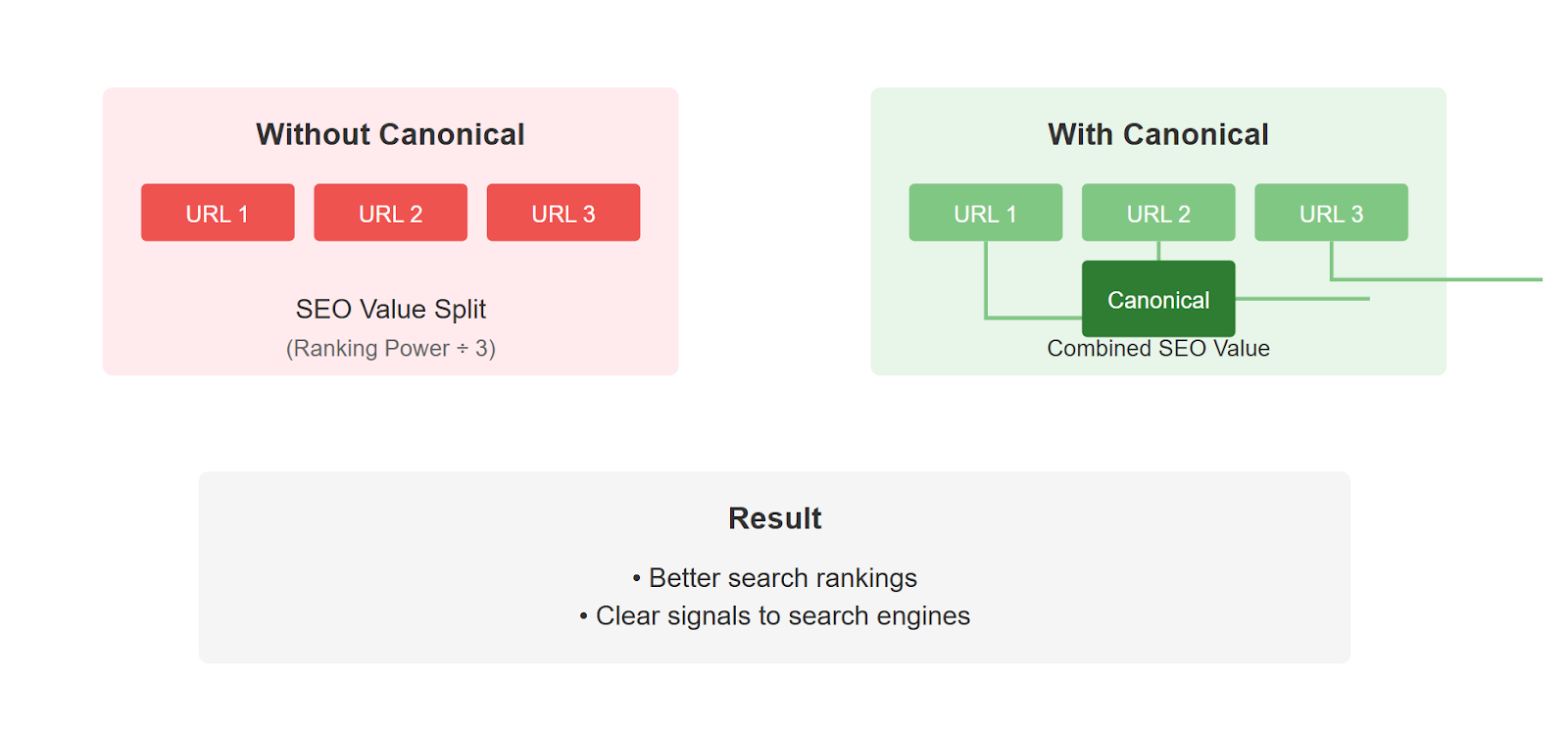
Even though these show the same content, search engines like Google see them as different pages. This causes two problems:
-
Google doesn’t know which version to show in search results
-
Your website’s ranking power gets split between these pages instead of focusing on one
To fix this, you add a simple line of code to your pages that says “Hey Google, this is the main version I want you to use”: link rel=“canonical” href=“https://www.yoursite.com/product” / This helps you in three ways:
-
All your SEO value goes to one page instead of being split up
-
You control which version shows up in search results
-
Google better understands your website structure
Why is URL Canonicalization Important?
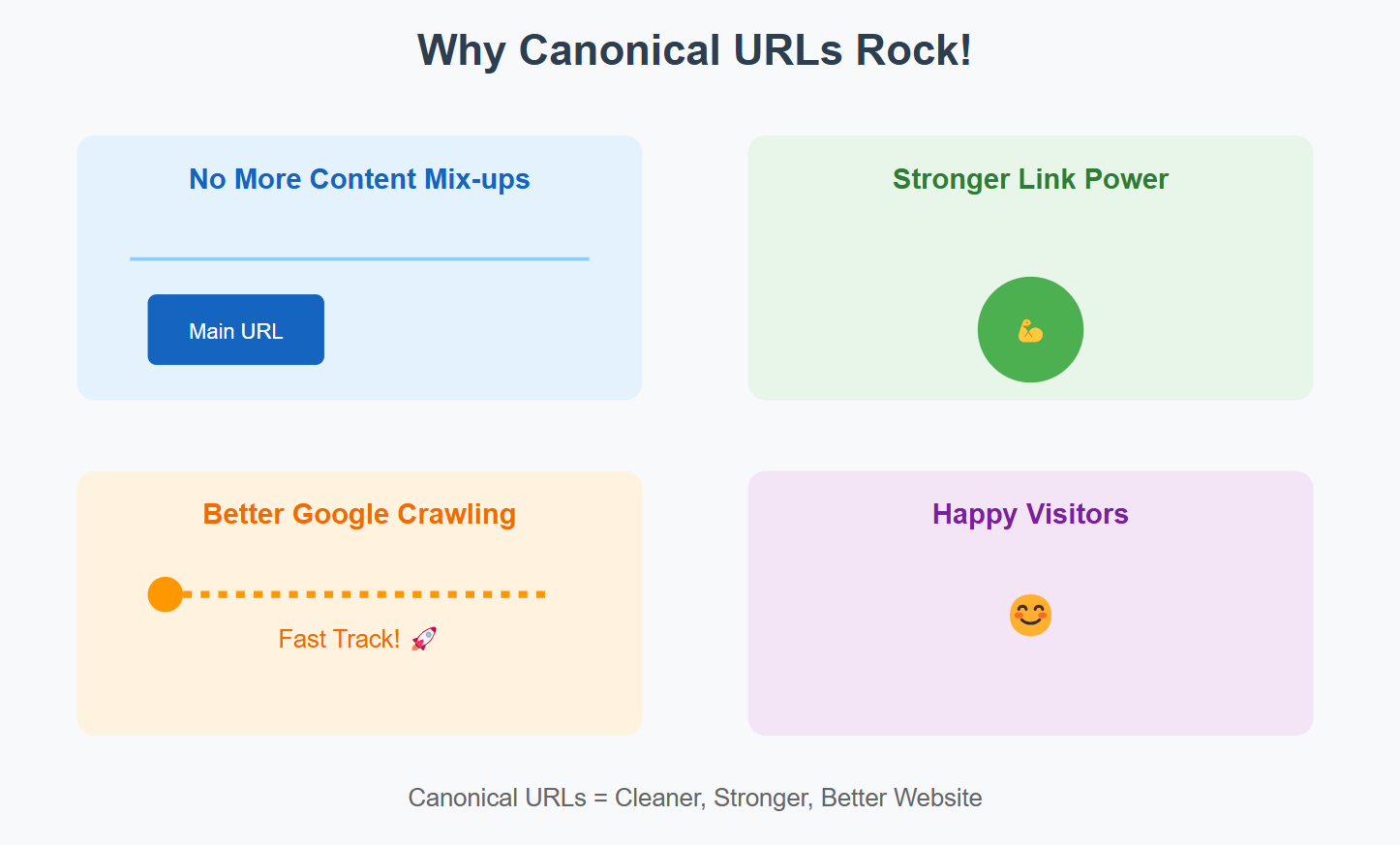
4 Big Reasons to Use Canonical URLs:
-
Stops Content Mix-ups When Google sees the same content on different URLs, it gets confused. Canonical URLs tell Google “Hey, this is the main version - focus on this one!” This keeps your site out of trouble and makes Google happy.
-
Makes Your Links More Powerful Think of links to your website like votes. Without canonicals, these votes get split between different URLs. With canonicals, all those votes go to one URL, making it stronger in search results.
-
Helps Google Read Your Site Better Google has limited time to look at your website. Canonical URLs are like a roadmap saying “Look here, skip that.” This helps Google focus on what matters and understand your site better.
-
Keeps Things Clean for Visitors Nobody likes a messy website. Canonical URLs ensure people always land on the right version of a page, no matter how they got there.
When Do You Need Canonical URLs?
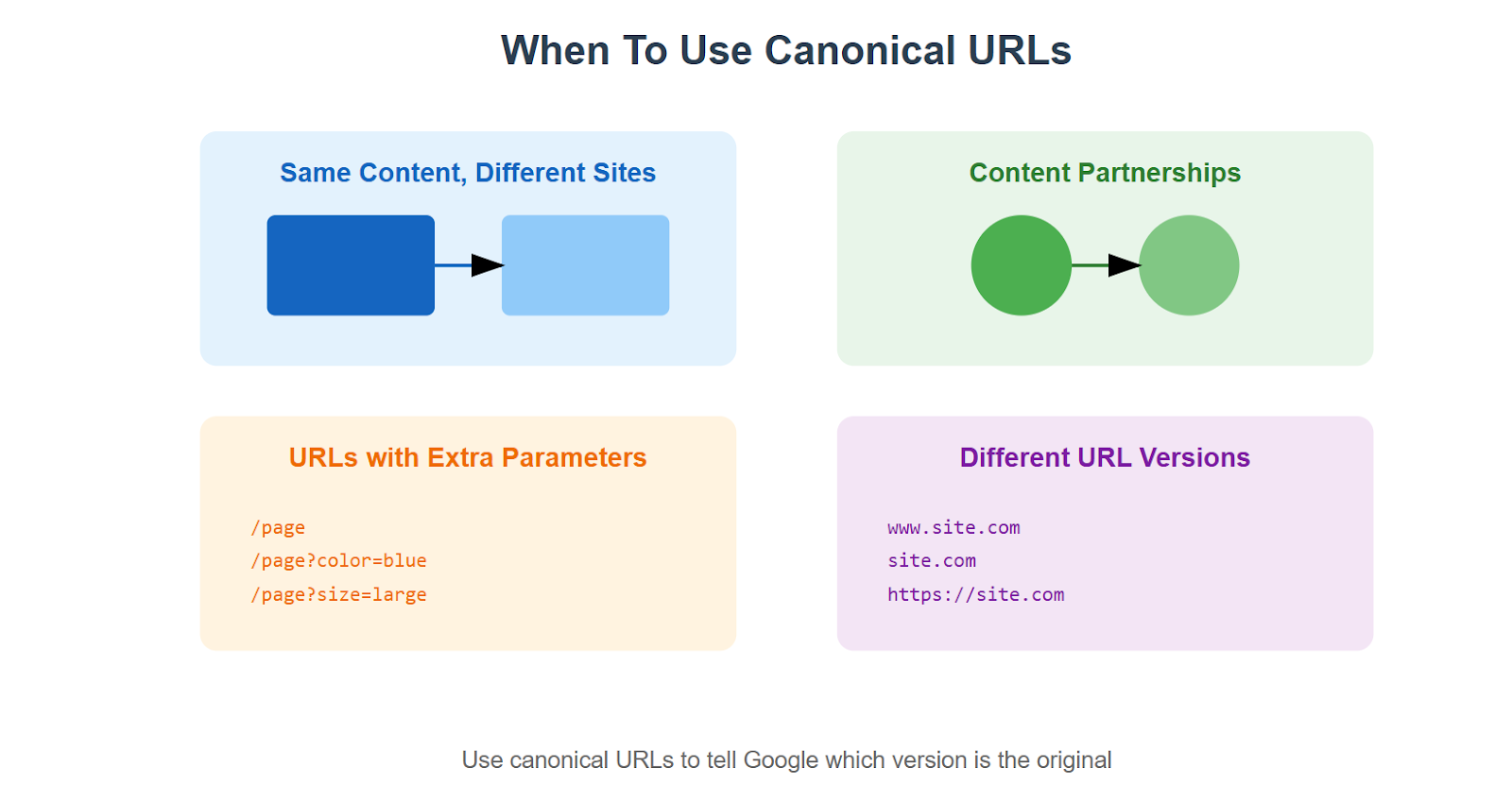
Here’s where they come in handy:
-
Sharing Content Across Different Websites: You have a great blog post that fits perfectly on multiple websites you own. Like a doctor who runs two clinics and wants to use the same “Back Pain Tips” article on both clinic websites. Using canonical URLs helps you point to the original version.
-
Content-Sharing Partnerships: If you let other websites republish your content (like when news sites share each other’s stories), canonical URLs help protect your original content. They tell Google “Hey, this was first published on my site!”
-
Website URLs With Extra Stuff: Sometimes your website adds extra bits to URLs for tracking or filtering:
-
yoursite.com/shoes (original)
-
yoursite.com/shoes?source=email
-
yoursite.com/shoes?color=blue
- Different Website Address Versions: Your website might be accessible through slightly different addresses:
-
yoursite.com
How to Implement URL Canonicalization?
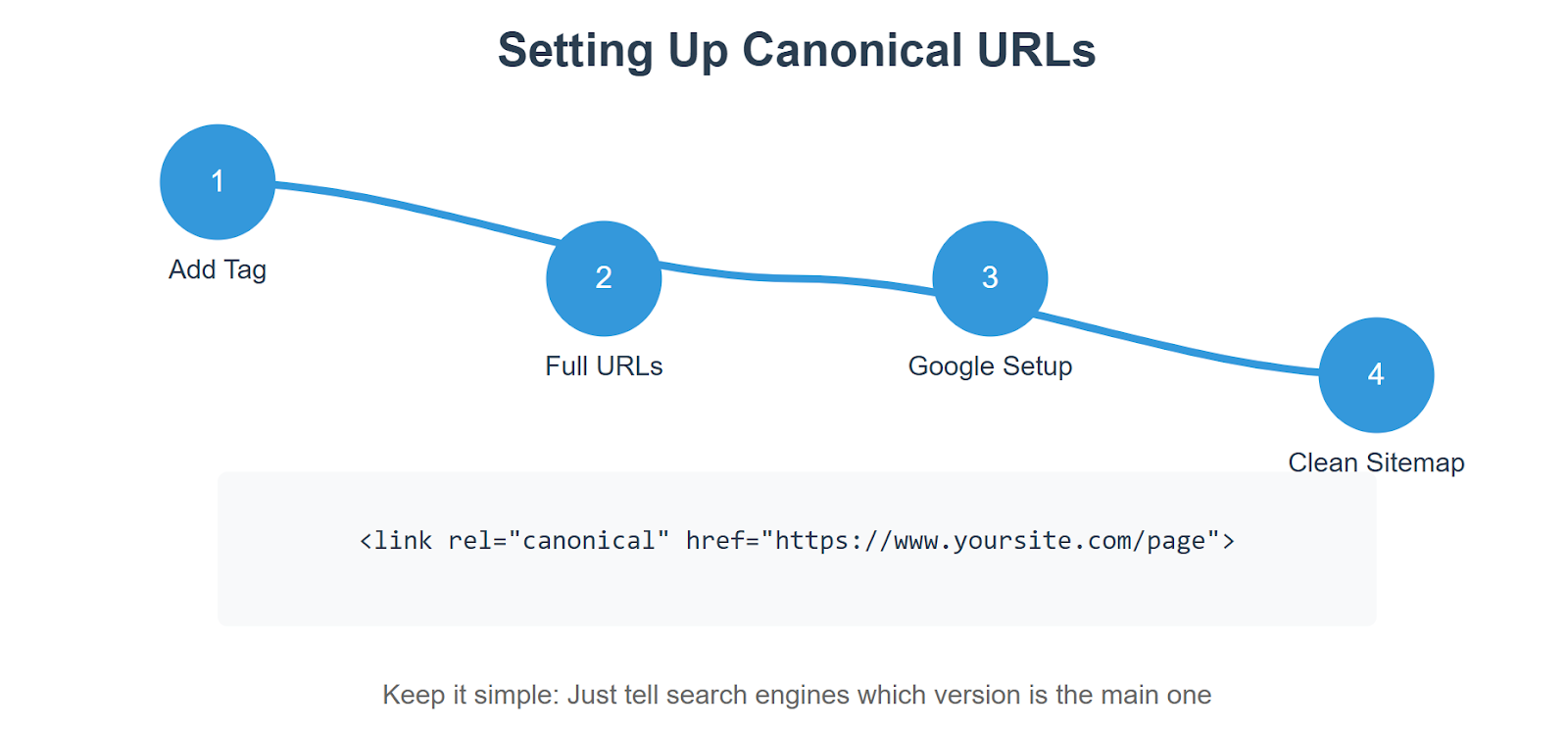
The first thing you need to do is add a canonical tag to your webpage. Don’t worry - it’s simpler than it sounds. Just add this line of code near the top of your webpage’s HTML, right after where it says :
Always use the complete address when writing your website address in this tag. For instance, use “https://www.yoursite.com/products” instead of just “/products”. This helps avoid any confusion about which page you’re pointing to. Next, you’ll want to set up Google Search Console properly. Log in to your account, click on Settings (the gear icon), and choose whether you want your site to show up with “www” or without it. This might seem like a small detail, but it helps keep everything consistent. Now, let’s talk about moving pages around. When you move content from one page to another, you need to set up what we call a “301 redirect.” Think of it like leaving a forwarding address when you move houses - it tells everyone (both visitors and search engines) where to find the new location of your content. Finally, take a look at your sitemap. This should only include your main pages - the ones you actually want people to find in search results. There’s no need to include duplicate pages or ones that redirect somewhere else.
Best Practices for URL Canonicalization
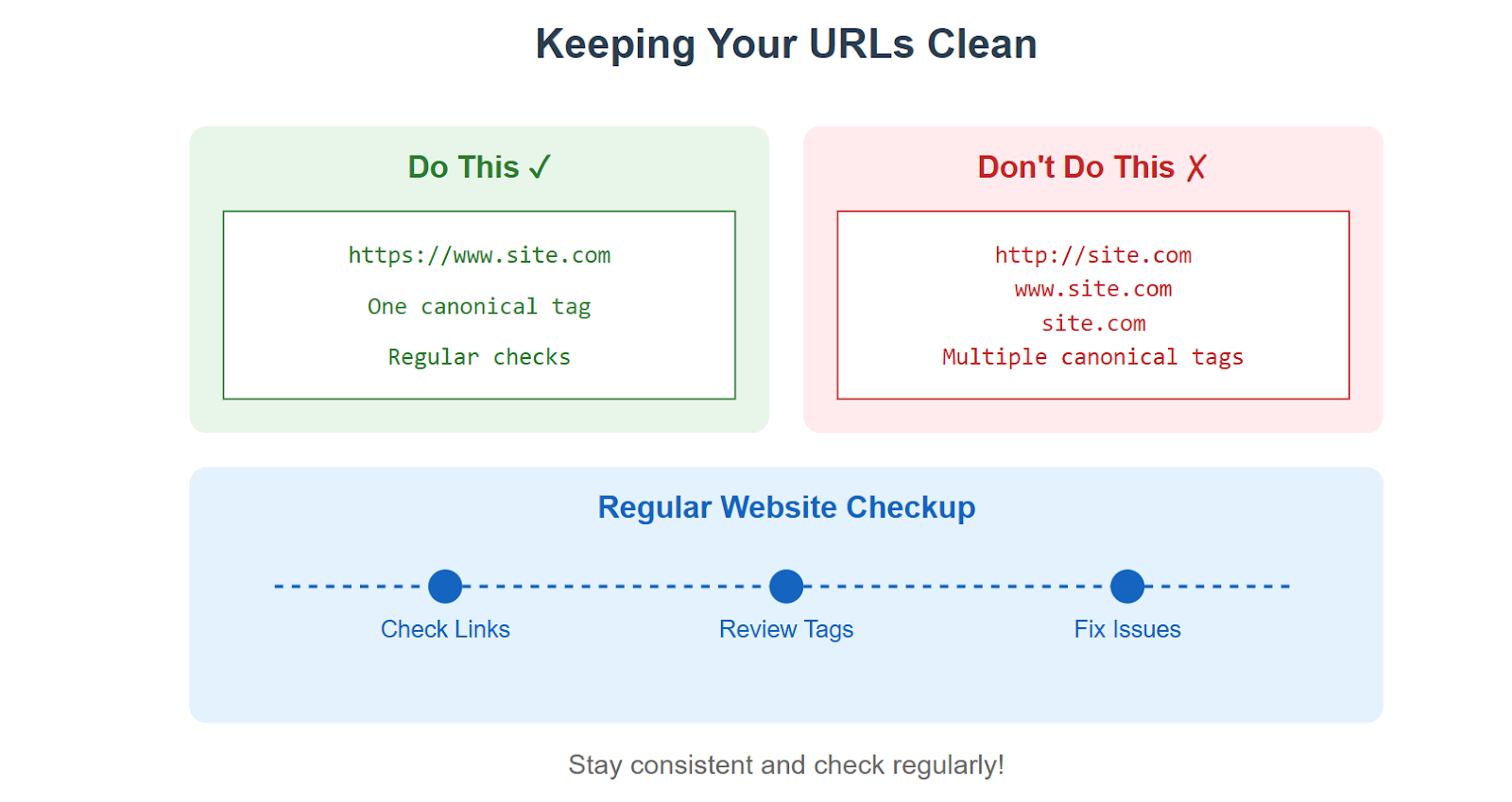
Keeping Your Website’s URLs Clean and Organized Three Main Rules to Follow:
- Keep Your Links Consistent When you link between pages on your website, always use the same format. Don’t mix and match between:
-
yoursite.com
Pick one style and stick with it everywhere on your site.
-
One Canonical Tag Per Page Think of canonical tags like name tags - each page should only wear one. Put it on the main version of your page and make it clear which version you want Google to see.
-
Regular Check-ups Just like you’d check your car for problems, regularly look at your website for URL issues. Use tools like Google Search Console to spot problems early. If you find any issues, fix them right away.
Some Extra Tips: When you use tracking codes in your URLs (like yoursite.com?source=email), make sure your canonical tag points to the clean version without these extras. And if you move pages around, set up proper redirects so visitors don’t get lost.
Tools to Help With URL Canonicalization
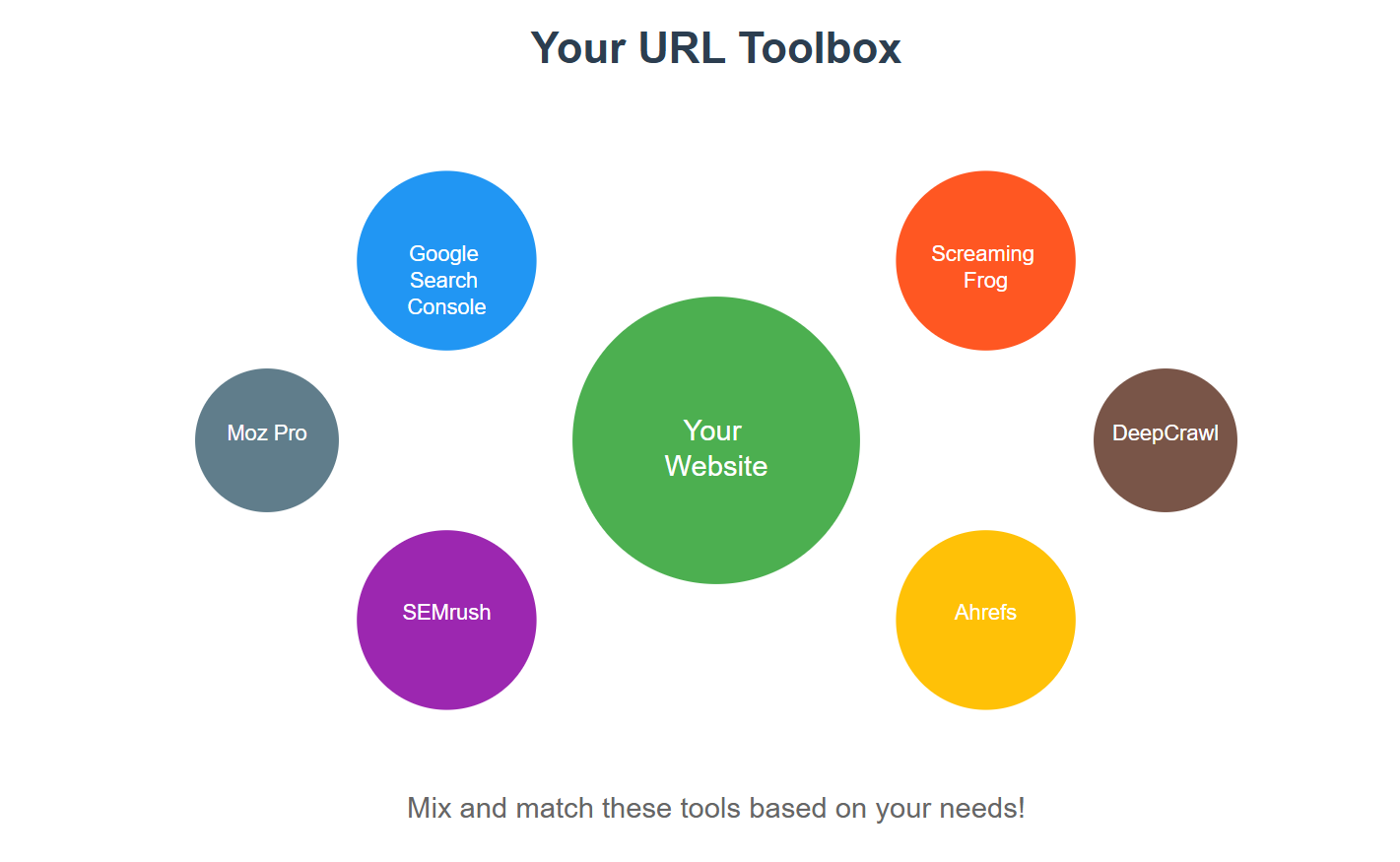
Google Search Console: Check What Google Actually Sees
This is the essential free tool, straight from Google. The URL Inspection tool shows you exactly which URL Google selected as canonical for a given piece of content, which is often not the one you specified — that gap is the single most useful thing this tool surfaces. Use it to confirm your canonical tags are actually being honored, not just present in your HTML.
Site Crawlers for Large Sites
For sites with thousands of URLs, a dedicated site crawler can scan every page, flag conflicting or missing canonical tags, and export a report you can work through systematically. These tools crawl your site the way a search engine bot would, so they catch canonicalization problems — like a page with two different canonical tags, or a canonical pointing to a redirect chain — that are hard to spot by hand.
What to Check Regularly
- Every indexable page has exactly one canonical tag.
- Canonical URLs use the full, absolute address (
https://example.com/page, not/page). - No canonical tag points to a redirect, a noindexed page, or another canonical tag (a “canonical chain”).
- Parameter-heavy URLs (tracking codes, sort/filter options) canonicalize to the clean version.
Common Mistakes of URL Canonicalization and How to Avoid Them
Common URL Mistakes That Can Hurt Your Website
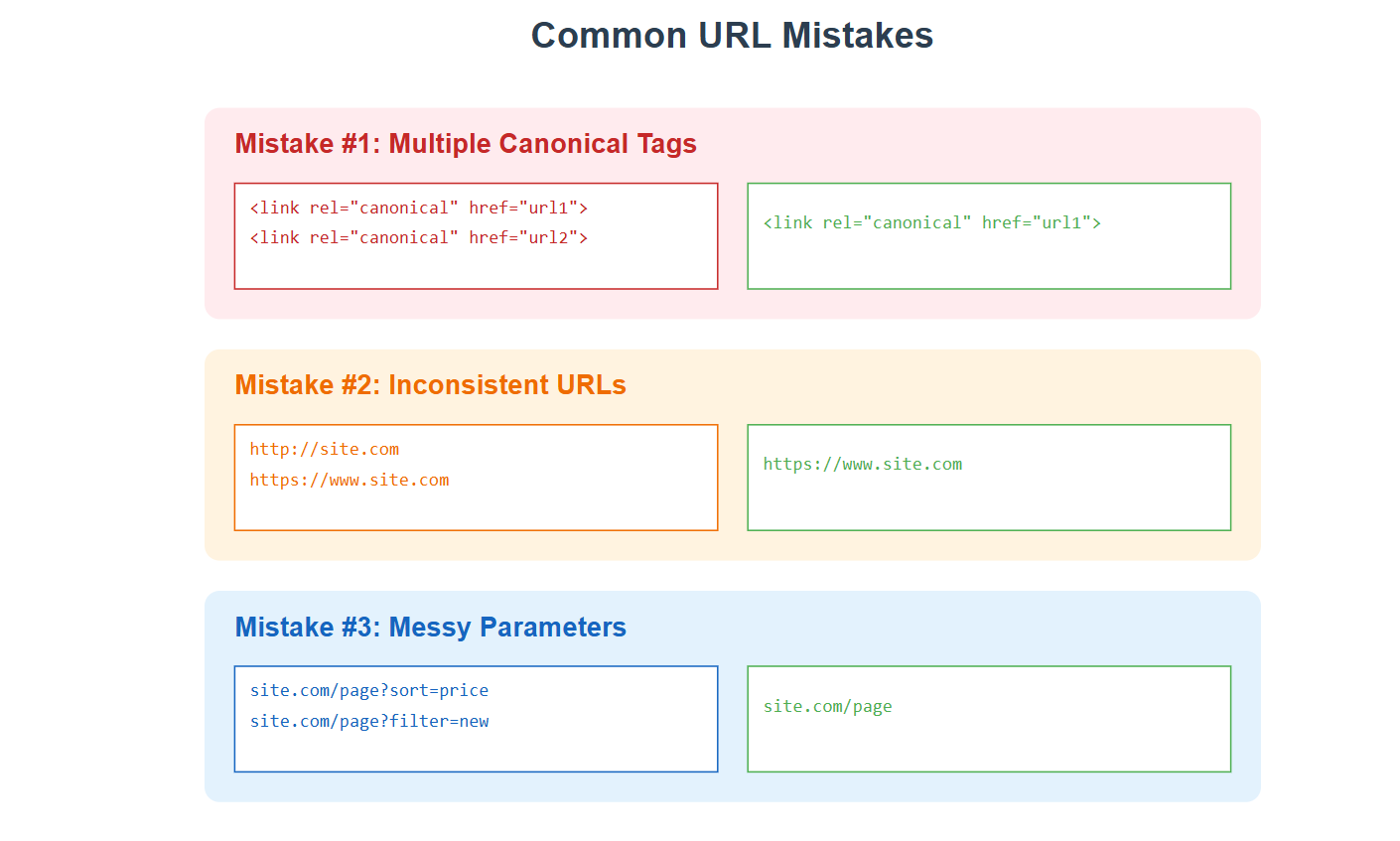
- Messy Canonical Tags The biggest mistake is having multiple canonical tags pointing to different places. Here’s what often goes wrong:
-
People accidentally add more than one canonical tag
-
Different parts of the website point to different main URLs
-
Copy-pasting leads to wrong URLs in the tags
Fix: Double-check your tags and make sure each page only has one canonical tag pointing to the right place.
- Mixed URL Formats Many websites accidentally use different formats across their site:
https://site.com http://www.site.com https://www.site.com Fix: Pick one format and stick to it everywhere. Don’t mix and match.
- Forgetting About Parameters When using tracking codes or filters, people often forget to manage URLs like:
site.com/products?sort=price site.com/products?color=blue Fix: Make your canonical tag point to the clean version: site.com/products
Other Common Mistakes to Watch For:
-
Not Checking Mobile URLs Some websites have separate mobile versions (m.site.com) but forget to connect them properly with canonical tags.
-
Breaking Canonical Chains This happens when Page A points to Page B, which points to Page C. Keep it simple - point directly to the main version.
-
Ignoring Language Versions If you have multiple language versions of your site, each needs its own proper canonical setup.
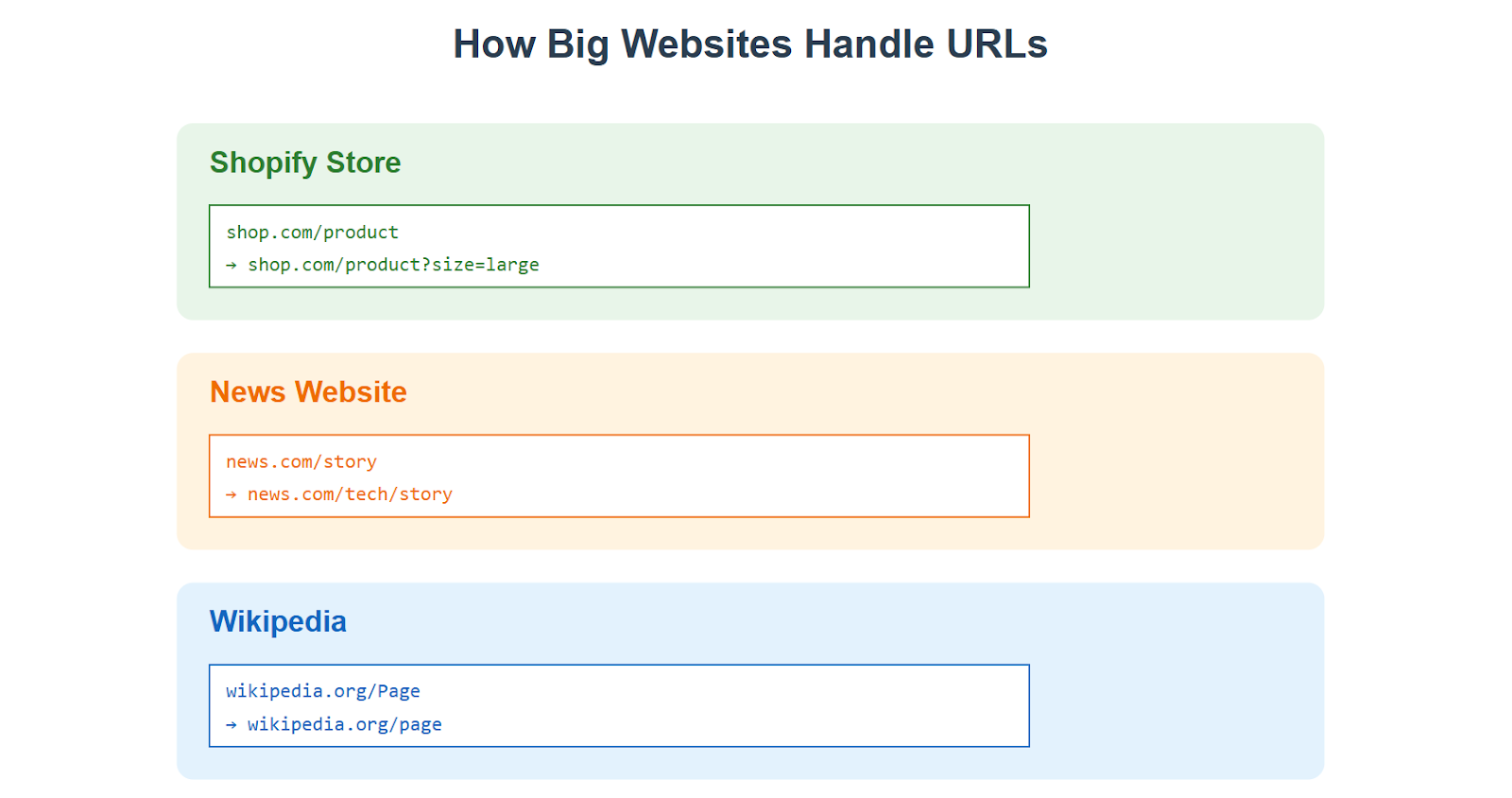
Real Website Examples - How They Handle Their URLs
Let’s look at three popular websites that do URL management right:
Shopify’s Smart URL System
When you visit an online store on Shopify, you might notice how clean their URLs stay, even with all those product variations. For example: Main product URL: shop.com/blue-shirt Other versions that point back to it:
-
shop.com/blue-shirt?size=large
-
shop.com/blue-shirt?color=navy
The magic? They all point back to that main product page. This keeps their search rankings strong and customers happy.
News Websites (Like The New York Times)
News sites have an interesting challenge. The same story might show up in:
-
Today’s headlines
-
Technology section
-
The author’s page
-
Archive section
They solve this by picking one main URL for each story and making all other versions point to it. Smart, right?
Wikipedia’s Clever Setup
Wikipedia is probably the best example. Think about how many ways you can reach the same page:
-
wikipedia.org/iPhone
-
wikipedia.org/iphone
-
wikipedia.org/Apple_iPhone
-
en.wikipedia.org/iPhone
Yet somehow, they all lead to the same place without causing any problems.
Why Canonicalization Matters for AI Search Visibility Too
Canonicalization isn’t only a traditional-SEO concern anymore — AI answer engines crawl and index pages the same way search engines do, so duplicate URLs create the same ambiguity for them. Google’s own documentation is explicit that canonicalization affects how content gets consolidated for indexing, and specifically warns against common shortcuts: “Don’t use the robots.txt file for canonicalization purposes”, since blocking a duplicate from crawling is not the same as telling Google which version to treat as authoritative (Google Search Central, retrieved 2026-09-19).
For a brand trying to earn citations inside ChatGPT, Perplexity, or Google AI Overviews, a fragmented, uncanonicalized page is a fragmented signal — the same content spread across several URLs means no single page accumulates the authority an AI system would need to treat it as the definitive source. Clean canonicalization is table stakes before any AEO/GEO work on top of it will show results. GrackerAI’s AI visibility monitoring tracks whether AI engines are actually citing your consolidated, canonical pages — or an outdated duplicate instead.
Final Thoughts: Making URL Canonicalization Work for You
URL canonicalization keeps your site organized for both visitors and crawlers — human and AI alike. The core discipline is simple:
- Choose one main version of each page.
- Use canonical tags correctly and consistently, with full absolute URLs.
- Check your setup regularly in Google Search Console’s URL Inspection tool, since Google can still choose a different canonical than the one you specify.
- Don’t substitute robots.txt or the URL removal tool for a proper canonical tag — they solve different problems.
Whether you’re running a small blog or a large e-commerce site, proper canonicalization is one of the highest-leverage technical SEO fixes available, and it compounds: consolidated ranking signals now also mean a cleaner signal for whatever AI system reads your site next.
Frequently Asked Questions## FAQs
Q: What is the difference between Normalisation and Canonicalisation?
A: Normalization converts data into a standard format (like changing uppercase to lowercase), while canonicalization specifically identifies the preferred version of a webpage when multiple URLs exist for the same content. Think of normalization as standardizing formats, and canonicalization as picking a favorite version.
Q: Why is canonicalization important for SEO?
A: Canonicalization is crucial for SEO because it:
-
Prevents duplicate content issues
-
Concentrates SEO value on one preferred URL
-
Helps search engines understand which version of a page to index
-
Makes your website’s ranking power stronger by focusing it on one URL
Q: What is canonicalization in cybersecurity?
A: In cybersecurity, canonicalization is the process of converting data into a standard, secure format to prevent security vulnerabilities. It ensures that web applications handle different versions of input (like file paths or URLs) safely, protecting against attacks that exploit multiple representations of the same data.
Q: What is canonicalization in input validation?
A: In input validation, canonicalization converts user input into a standard, consistent format before processing it. For example, converting file paths like ”../folder” to “/folder” helps prevent security vulnerabilities by ensuring all inputs are processed in their simplest, most secure form.
Q: What is data canonicalization?
A: Data canonicalization is the process of converting data into a standard, consistent format across a system. It ensures that different representations of the same data (like dates in various formats) are handled uniformly, improving data quality and system efficiency.
Q: Does canonicalization affect whether AI answer engines like ChatGPT cite my page?
A: Indirectly, yes. AI answer engines crawl and index pages using similar signals to traditional search, so a page whose authority is split across several duplicate URLs is a weaker candidate for citation than one consolidated page with a clear canonical tag. Fixing canonicalization won’t guarantee a citation, but it removes one real obstacle to earning one.
How This Guide Was Sourced
Written by the GrackerAI research and content team (gracker.ai). The canonicalization mechanics and the robots.txt guidance above are drawn from Google Search Central’s documentation on consolidating duplicate URLs, retrieved 2026-09-19. The AI-citation implications are ANALYSIS — a reasoned extension of documented crawling behavior, not a benchmarked statistic from GrackerAI’s own data.
No GrackerAI telemetry is used in this guide. GrackerAI builds AI search visibility tracking and AI-optimized content production for cybersecurity and B2B SaaS brands; see AI visibility monitoring and GEO platform features for the AI-citation side of technical SEO covered above. Related reading: a comprehensive technical SEO site audit checklist, technical SEO vs. content SEO, and what backlinks are and why they matter.
Related Articles
- GEO
Beyond Content Creation: A Complete GEO Strategy for Cybersecurity Brands Using Email Marketing to Distribute Content
Learn how cybersecurity brands can combine GEO with targeted email marketing to distribute research, build trust, and make their expertise easier to discover.
-
 productivity
 The Cybersecurity Marketer's Productivity Stack: 20 Tools for Research, Content Creation, and AI Visibility
The 20 tools across research, content creation, and AI visibility that help cybersecurity marketers protect their focus and get cited in AI search.
- GEO
GEO for Microsoft Partners: Showing Up in "Best Partner" Answers
How Dynamics 365 and Business Central partners can get named when buyers ask ChatGPT for the best partner: buyer prompts, AI sources and a 5-step playbook.
-
 cybersecurity content audit
 How to Audit Cybersecurity Content for Accuracy and Originality
Cybersecurity content with incorrect facts destroys confidence fast. Here's a practical audit framework for correctness and originality that preserves the credibility of your security publications.