Getting the Picture: 10 Best AI Image Generators for 2026

Creating visuals for your marketing used to mean long photoshoots or endless scrolling through stock photo sites. By 2026, AI image generators are standard marketing infrastructure: Adobe's 2026 Creators' Toolkit Report found that 87% of creators using creative AI say it has accelerated the growth of their business or audience, and 75% now describe it as integrated or essential to how they work (Adobe, survey of 16,000+ creators across eight countries, retrieved 2026-09-16).
Good visuals matter for more than engagement now: content structured to be understood and cited by AI models increasingly needs images with clean alt text and clear context, not just eye-catching design. Once you've generated an image, whether it's citation-ready is a separate question of resolution, contrast, and consistency — our guide to image enhancement tools for AI visibility covers the tools that clean up and upscale visuals so they don't get cropped or ignored by AI search extraction.
We looked at the top contenders to see which ones really deliver for marketing professionals. Our evaluation was based on image quality, how well they understand your prompts, speed, cost, and special features designed to make a marketer's life easier. Let's find the right tool to help you bring your creative ideas to life.
How We Judged the Tools
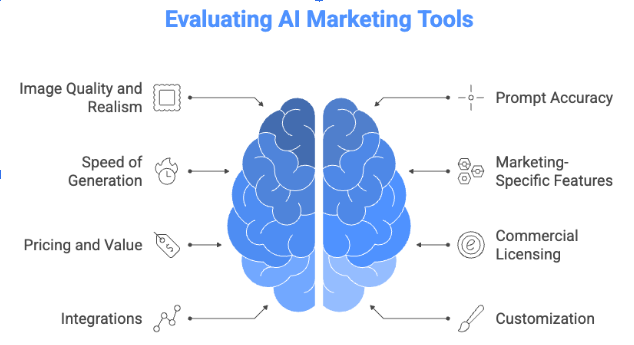
To give you the full scoop, we dug into what really helps marketing campaigns thrive. We looked at image quality and realism, how spot-on the AI is with your prompts, and how quickly it brings your vision to life. Plus, we considered handy marketing tools like brand kits, pricing that makes sense, commercial licensing for peace of mind, easy integrations, and all the customization options you need.
The Top 10 AI Image Generators for Marketing
1. Wixel
Wixel is a powerful, user-friendly platform designed with creators and business owners in mind. It combines AI image generator tools with a background remover and a full suite of design AI tools, making it easy to create cohesive marketing materials.
- Features for Marketers: Its standout feature is the deep integration with a complete website building and marketing platform. You can generate an image and immediately place it on your site, in an email campaign, or on a social post, all within one ecosystem.
- Pricing: Wixel offers image generation as part of its premium plans, providing excellent value.
- Best for: Entrepreneurs and small businesses who want an all-in-one solution for their marketing visuals and web design.
- Pros: All-in-one platform, easy to use, great for creating consistent brand visuals.
- Cons: Generation credits might be limited on lower-tier plans.
2. Midjourney
Midjourney is famous for producing artistic and incredibly high-quality images. It operates through the Discord chat app, which gives it a unique, community-focused feel.
- Strengths: It excels at creating imaginative and brand-defining imagery. If you need a breathtaking hero image for a campaign, Midjourney is a top choice.
- Pricing: Subscription-based, with different tiers based on the number of images you need to generate.
- Best for: Creative campaigns, brand imagery, and concept art.
- Pros: Unmatched artistic quality, very active community for inspiration.
- Cons: The Discord-based interface can take some getting used to.
3. DALL-E 3
Integrated directly into ChatGPT Plus, DALL-E 3 makes image creation as simple as having a conversation. You can describe what you want, and then refine it with follow-up prompts.
- Marketing Applications: Perfect for brainstorming ideas and creating visuals on the fly. You can ask for ten different ad concepts and get them in seconds.
- Pricing: Included with a ChatGPT Plus subscription or available via API for custom integrations.
- Best for: Marketers who need to iterate quickly and prefer a conversational creation process.
- Pros: Easy to use, great for generating ideas, strong text-to-image understanding.
- Cons: Less fine-grained control over the final image compared to other tools.
4. Adobe Firefly
Built by the creators of Photoshop and Illustrator, Adobe Firefly is designed for professional creatives. Its biggest advantage is its seamless integration with the Adobe Creative Cloud.
- Features: Trained on commercially safe data, so you don't have to worry about copyright issues. It's built for team collaboration.
- Pricing: Available through Adobe Creative Cloud subscriptions.
- Best for: Marketing teams and designers who already live in the Adobe ecosystem.
- Pros: Commercially safe, integrates with Photoshop and Illustrator, great for professional workflows.
- Cons: Can be more expensive if you aren't already a Creative Cloud subscriber.
5. Canva AI (Magic Media)
Canva put design tools in everyone's hands, and its AI generator, Magic Media, does the same for image creation. It's built right into the familiar Canva interface.
- Features: Generate an image and drop it directly into a social media template, presentation, or ad creative. It's all in one place.
- Pricing: Included in Canva Pro and Canva for Teams plans, which offer great overall value.
- Best for: Social media managers, bloggers, and small businesses that rely on Canva for their day-to-day design work.
- Pros: Extremely easy to use, integrated with a massive library of templates.
- Cons: Image quality might not be as high-end as specialized tools like Midjourney.
6. Leonardo.ai
Leonardo.ai gives you an impressive amount of control. You can train your own AI models on your brand's style, ensuring every image feels consistent.
- Features: Offers a wide variety of pre-trained models and the ability to create your own. This is huge for maintaining a consistent brand aesthetic.
- Pricing: A generous free tier is available, with paid plans for more features and faster generation.
- Best for: Marketers who need to produce a high volume of on-brand assets.
- Pros: Excellent for brand consistency, fine-tuned control, strong community features.
- Cons: Can have a steeper learning curve to master all the features.
7. Ideogram
One of the biggest challenges for AI image generators is rendering text accurately. Ideogram is one of the best at it, making it a strong choice for ads and social media posts.
- Features: Its ability to reliably generate images with text sets it apart. Want a picture of a coffee cup with your brand's slogan on it? Ideogram can do that.
- Pricing: Offers a free tier and affordable subscription options.
- Best for: Creating text-heavy marketing images, logos, and social media graphics.
- Pros: Superior text generation, high-quality images, easy to use.
- Cons: Still a newer platform, so some features are less developed.
8. Stable Diffusion
Stable Diffusion is the open-source powerhouse of the AI image world. You can run it on your own computer or use one of the many web-based services that offer it.
- Features: Its open-source nature means endless customization. If you have the technical know-how, you can fine-tune it to do almost anything.
- Pricing: Free if you run it locally (requires a powerful computer), with various pricing for cloud-based versions.
- Best for: Technical marketers and teams who want to build a completely custom image generation workflow.
- Pros: Ultimate flexibility and control, no subscription fees for local use.
- Cons: Requires technical expertise to set up and use effectively.
9. Microsoft Designer (Copilot)
Integrated into the Microsoft ecosystem, Designer makes AI image creation accessible to anyone using Microsoft 365. It's powered by DALL-E and focused on ease of use.
- Features: Simple prompts and integration with tools like PowerPoint and Word. It offers a solid free option for quick designs.
- Pricing: A generous free version is available, with more features included in Microsoft 365 subscriptions.
- Best for: Marketers who work heavily within the Microsoft suite and those on a tight budget.
- Pros: Great free offering, easy for beginners, integrates with Microsoft products.
- Cons: Less advanced customization options.
10. Shutterstock AI
For marketers accustomed to stock photography, Shutterstock's AI generator is a natural next step. It combines a massive stock library with AI generation capabilities.
- Features: The biggest plus is clear commercial licensing. Shutterstock indemnifies its enterprise users, offering peace of mind.
- Pricing: Based on Shutterstock's credit or subscription plans.
- Best for: Enterprises and traditional marketing teams transitioning from stock photos to AI.
- Pros: Clear licensing and legal protection, familiar platform for stock photo users.
- Cons: Can be more expensive than other options; images may have a "stock" feel.
Head-to-Head Comparison
Tool | Monthly Cost (Est.) | Quality | Speed | Marketing Features | Commercial Rights | Ease of Use | Best For |
Wixel | Free / Included in plans | ★★★★☆ | ★★★★☆ | ★★★★★ | Clear | ★★★★★ | All-in-one marketing |
Midjourney | $10–$120 | ★★★★★ | ★★★★☆ | ★★★☆☆ | Clear | ★★★☆☆ | Creative campaigns |
DALL-E 3 | $20 (ChatGPT+) | ★★★★☆ | ★★★★★ | ★★★☆☆ | Clear | ★★★★★ | Quick iterations |
Adobe Firefly | $5–$55 (Adobe CC) | ★★★★☆ | ★★★★☆ | ★★★★★ | Safest | ★★★★☆ | Adobe users |
Canva AI | $13 (Canva Pro) | ★★★☆☆ | ★★★★★ | ★★★★★ | Clear | ★★★★★ | Social media |
Leonardo.ai | $0–$48 | ★★★★☆ | ★★★★☆ | ★★★★★ | Clear | ★★★★☆ | Brand consistency |
Ideogram | $0–$15 | ★★★★☆ | ★★★★☆ | ★★★★☆ | Clear | ★★★★☆ | Images with text |
Stable Diffusion | $0+ (Varies) | ★★★★★ | ★★★☆☆ | ★★★★★ | Varies | ★★☆☆☆ | Custom workflows |
Microsoft Designer | $0+ (Microsoft 365) | ★★★☆☆ | ★★★★★ | ★★★★☆ | Clear | ★★★★★ | Beginners |
Shutterstock AI | Varies | ★★★☆☆ | ★★★★☆ | ★★★★☆ | Safest | ★★★★☆ | Enterprise teams |
Special Category Winners
- Best Overall for Marketing: Wixel offers the best combination of quality, ease of use, and integration with a full marketing suite.
- Best Value for Money: Leonardo.ai provides a generous free tier and affordable plans packed with pro features.
- Best for Social Media Marketing: Canva AI is the winner due to its seamless integration with countless social media templates.
- Best for Ad Creatives: Ideogram takes the prize for its ability to cleanly render text in images.
- Best for Brand Consistency: Leonardo.ai wins again with its custom model training.
- Best for Beginners: Microsoft Designer and Canva AI are tied for their incredibly simple interfaces.
- Best for Enterprise Teams: Adobe Firefly and Shutterstock AI offer the security and collaboration features large companies need.
How to Choose the Right Tool
Think about your specific needs:
- Budget: How much can you spend? Start with free tiers from Leonardo.ai or Microsoft Designer to experiment.
- Team: Are you working solo or with a team? Look for collaboration features in tools like Adobe Firefly.
- Content Type: If you make a lot of social posts, Canva is a great fit. If you need epic brand imagery, try Midjourney.
- Skill Level: Be honest about your technical comfort. Wixel and Canva are great for everyone, while Stable Diffusion is for the pros.
- Image Volume: How many images do you need per month? Check the limits on each plan.
Expert Tips for Marketing With AI Images
- Master Your Prompts: Be specific. Instead of "a dog," try "a happy golden retriever puppy playing in a sunny field, photorealistic, warm lighting."
- Stay on Brand: Use your brand's color palette and style keywords in your prompts to maintain consistency.
- Combine With Design Tools: Use AI to generate the core image, then bring it into a tool like Wixel's editor or Photoshop to add text, logos, and other branding elements — the same repurposing approach works well for turning one hero image into a full set of campaign assets.
- Check Your Rights: Always use a tool that provides a clear commercial license for marketing use.
- Be the Editor: AI is a creative partner, not a replacement for your judgment. Review every image to ensure it meets your quality standards and aligns with your brand.
The Future Is Visual
AI image generation is only going to get better and more integrated into marketing workflows, with more tools able to generate images, video, and 3D models from a single prompt. Preparing your team now means being ready to take advantage of those capabilities as they roll out, rather than retrofitting a workflow around them later.
The same AI-assisted-visuals logic shows up one step earlier in a startup's life, too: AI pitch-deck generators lean on comparable image and template engines to turn a prompt into investor-ready slides, with the same tradeoff between speed and on-brand polish covered above.
Conclusion
There isn't a single "best" AI image generator for every marketer. The right one for you depends on your budget, goals, and workflow — the good news is you have strong options at every price point.
The best way to find your fit is to start experimenting. Most of these tools offer free trials or free tiers. Try a few prompts across two or three tools and see which one actually gets you to a usable image the fastest.
Frequently Asked Questions
Can AI-generated images be used commercially?
Yes, most major platforms like Wixel, Adobe Firefly, and Midjourney grant commercial usage rights with their paid plans. Always check the terms of service for the specific tool you are using.
How do I ensure my AI images don't look generic?
Craft detailed prompts and use features that allow for style consistency, like Leonardo.ai's custom models. Combine AI images with your own branding elements in a design editor.
Are AI image generators replacing human designers?
No, they are powerful assistants. They help designers work faster and explore more creative ideas. The best results come from a designer guiding the AI.
What's the learning curve for these tools?
It varies. Tools like Canva AI and Microsoft Designer are very easy for beginners. Platforms like Midjourney and Leonardo.ai have a moderate learning curve, while Stable Diffusion requires technical knowledge.
How do these tools handle brand guidelines?
Some, like Leonardo.ai, let you train models on your brand style. For others, you can maintain consistency by using specific keywords (e.g., "in the style of xyz," "using a color palette of #FF5733 and #33CFFF") in your prompts.
![10 Best Local Rank Tracker Tools: In-Depth Comparison Guide [2025]](https://cdn.pseo.one/6abcb68a626591c40e1c8aa6/687e1c1ef6fe799d288518df/68809c373eb8562bcf68975d/10-best-local-rank-tracker-tools-comparison-guide/feature-image.jpg)