AI Visibility Optimization · Tasks

Insight does not ship. Assigned work does.

Nearly every screen in GrackerAI has an Add Task button. Click it on a citation, a prompt, an alert, an audit issue or a diagnosis report, and you get a task that already carries the source context and a what to do checklist. Assign it, prioritize it, date it, and watch it close. The finding never becomes a screenshot in a deck again.

No credit card required. Your first tasks in about a minute.

GrackerAI dashboard showing AEO and GEO citation tracking across ChatGPT, Perplexity, Claude, and Gemini
The reason most AI visibility programs stall has nothing to do with the data.

You have findings. What you lack is a way to act on them.

Problem one

The translation tax

Someone spots a gap in the dashboard, opens Jira, retypes the context from memory, drops in a screenshot, and hopes the writer understands it. Half the detail is gone by the time it reaches the person doing the work.

Problem two

The lean team problem

A marketing team of three is looking at a hundred findings. Without owners and dates, the list is not a plan. It is a source of guilt that everyone learns to scroll past.

Problem three

The duplicate pile

Two people notice the same slipping citation in the same week and file it twice. Now the backlog is inflated, nobody trusts the count, and the real priorities are buried under noise.

How it works

Every finding is one click away from being someone's job this week.

The context travels with the task, so nobody has to reconstruct it later.

Spot

A citation, prompt, alert, audit issue or diagnosis catches your eye.

Click

Add Task, from the screen you are already on.

Inherit

The source, the numbers and a what to do checklist come with it.

Assign

Set an owner, a priority and a due date.

Close

Track status, catch overdue work, keep the count honest.

A finding in. An owned, dated, context-rich piece of work out.

The hard part we solved

The easy version of a task manager is a text box. The honest version is context inheritance, and that is most of the engineering. When you create a task from a lost citation, the task has to know which prompt, which engine, which source, what the number was before, and what a reasonable person should do next. That means every surface in the platform has to be able to describe itself in a form a writer who has never opened the dashboard can act on. We built that description layer once, per object type, so a task created from an AEO Audit issue reads completely differently from one created from a competitor alert, and both read like instructions rather than notes.

The second hard part is duplication. Visibility data is noisy by nature, and the same underlying problem surfaces in several places: a prompt you are losing, a page that fails the audit, and a recommendation card can all be the same job. Left alone, that produces three tickets and a backlog nobody believes. So tasks are de-duplicated automatically against what already exists, which keeps the queue small enough that a lean team still trusts it in month six.

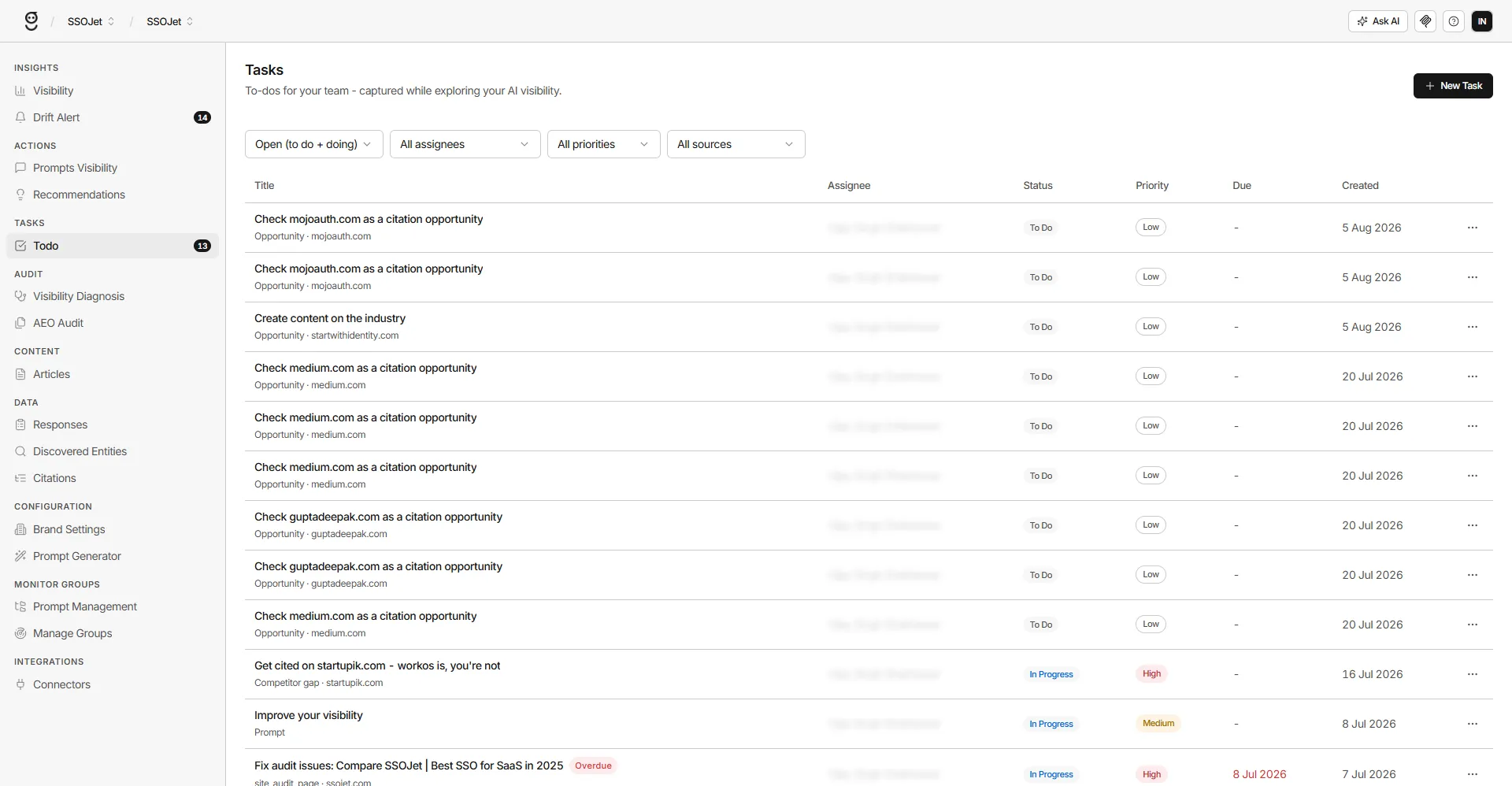
Add Task lives on nearly every screen

If GrackerAI can show you a problem, it can hand you the task for it.

Citations, prompts, responses, alerts, content gaps, discovered competitors, diagnosis reports, page audits. If GrackerAI can show you a problem, it can hand you the task for it without a context switch. The button is where the insight is, which is the only place anyone is actually motivated to click it.

  • One click from the finding, no retyping
  • Works across intelligence, optimization and audit surfaces
  • No exporting to a doc, no copy paste into a tracker
Every surface, one button
Citations
Prompts
Responses
Alerts
Content gaps
Competitors
Diagnoses
Page audits
The task already knows why it exists

No one has to ask the filer what they meant.

Every task arrives pre-filled with the source context and a checklist of what to do about it. The writer opening it three days later sees the prompt, the engine, the competitor page, and the specific steps, without having to ask the person who filed it what they meant.

  • Source object, metrics and timestamp attached
  • A what to do checklist written for the fix, not a generic template
  • Readable by someone who has never opened the dashboard
Inherited context
Source LLM Citations · Perplexity
Prompt "Best SAML SSO provider for B2B SaaS"
Metric Dropped from cited to absent, 3 days ago
What to do 3 steps attached
Owners, priorities, dates, and honest overdue flags

A list a head of marketing can run a standup against.

Tasks support assignees, priority levels, status and due dates, and they flag themselves when they slip. That is the difference between a list of good intentions and a program a head of marketing can run a weekly standup against.

  • Assign to a person, not a pile
  • Priority that maps to visibility impact
  • Overdue flags so nothing quietly rots
This week's queue
Fix schema on /platform/sso High Due tomorrow
Rewrite CIAM comparison page Medium Due in 4 days
Publish SAML SSO brief High Overdue by 2 days
Automatic de-duplication keeps the queue trustworthy

The same problem noticed twice still becomes one task.

The same finding surfacing on two screens does not spawn two tickets. Tasks are matched against what already exists before they are created, so your backlog reflects the number of real problems rather than the number of times someone noticed one.

  • Duplicate detection on creation
  • Backlog counts you can actually plan against
  • Fewer tickets, more finished work
Citation alert
Audit issue
Recommendation
One task, one owner
How it compares

A dashboard plus a tracker is two tools. This is one click.

A visibility dashboard plus your trackerGrackerAI Tasks
Findings live here, work lives thereFindings become work in one click
Context retyped by hand, badlyContext inherited automatically
Screenshots as the handoff formatLive source object attached
Same problem filed three timesDe-duplicated on creation
No owner, no date, no follow throughAssignee, priority, due date, overdue flag
Nobody knows if the fix workedThe finding it came from is still being tracked
In action

Two moments where a task beats a red cell in a dashboard

Citation starts slipping

A citation starts slipping on a Tuesday

  1. An alert fires: you dropped out of a prompt on Perplexity and Gemini.
  2. Click Add Task from the alert itself.
  3. The task carries the prompt, both engines, and the competitor now cited.
  4. Assign to content with a due date, and track the prompt as it recovers.
Ninety issues at once

The audit returns ninety issues

  1. Run the Technical AEO Audit across your sitemap.
  2. Sort by severity and open the worst offenders.
  3. Convert each page's issues into a single task with the fix list attached.
  4. Hand the batch to your developer as a sprint, not a spreadsheet.
What every task carries

Your findings list is not a plan until it has owners.

A hundred-item backlog is not a program. A queue with owners, priorities and dates that a three-person team actually clears is.

1 click from any finding to an assigned task
8+ surfaces citations, prompts, responses, alerts, gaps, competitors, diagnoses, audits
0 retyping context and checklist inherited automatically
De-duped so the backlog count stays honest
Related

Where the findings that become tasks come from.

Recommendation Engine

The ranked list of what to fix first. Tasks are how those recommendations become owned work.

See Recommendation Engine

Technical AEO Audit

Every graded page issue converts into an assignable task with the fix attached.

See AEO Audit

Visibility Diagnosis

Briefs and gap reports become tasks with the competitor evidence still attached.

See Visibility Diagnosis

Do not let AI keep
recommending someone else

Get your free AI Visibility Score in about a minute. See exactly where you stand, where competitors are beating you, and the ranked fixes to get into the answer. No credit card, no commitment.

Free in about a minute. Trusted by 500+ B2B and security teams.

Partnered with
  • Microsoft
  • Google
  • Amazon AWS
  • Cloudflare
  • Nvidia
Powered by
  • Google Gemini
  • Open AI
  • Claude