AI Visibility Integration ยท GrackerAI MCP

Ask your AI assistant about your AI visibility.

GrackerAI runs a Model Context Protocol server, so your visibility scores, competitor citations, prompt gaps and recommendations are available right inside Claude, ChatGPT, or any MCP-compatible assistant. Ask in plain language, get a live answer, and act on it without ever switching to a dashboard.

No credit card required. Connect in a couple of minutes.

GrackerAI dashboard showing AEO and GEO citation tracking across ChatGPT, Perplexity, Claude, and Gemini
Your work moved into an AI assistant. Your visibility data did not.

The best insight goes unused if it lives behind a login you have to remember to open.

You plan, draft and analyze inside an assistant now. But to check your AI visibility you stop, switch to another dashboard, click through filters, find the number, and carry it back. That context switch is small enough to skip, so most of the time it gets skipped, and the data you are paying for sits unqueried.

Problem one

The dashboard tax

Every answer means leaving what you are doing, opening another tab, and navigating to the right view. Friction that small still quietly kills the habit of checking.

Problem two

Dashboards answer their own questions

A dashboard shows what its designer anticipated. Your real questions are ad hoc and comparative, and they rarely fit neatly into a prebuilt chart or filter.

Problem three

Data stranded from the work

You ask your assistant to draft a comparison page, but it has no idea which prompt to target or which rival is winning, because that lives somewhere it cannot reach.

Your AI visibility, answerable in plain language inside the assistant you already use, with the data live and the next action one message away.

How a question gets answered

Plain language in, a live answer in the same window

You do not learn a query language or open anything new. You ask, your assistant figures out what to call, and GrackerAI answers from your live account. Here is the round trip behind a single question.

You ask

A plain-language question in your assistant.

It calls

The assistant picks the right GrackerAI MCP tool.

Server queries

GrackerAI pulls from your live account.

Returns

A structured, current result comes back.

It answers

In plain language, ready for you to act on.

One question in. A live answer, in the window you were already in.

The hard part we solved

MCP, the Model Context Protocol, is an open standard for letting AI assistants call external tools and data. GrackerAI runs an MCP server that exposes your visibility data and actions as tools any compatible assistant can use. When you ask a question, the assistant translates it into the right call, the server answers from your live account, and the assistant replies in plain language.

You connect your account once. The data stays scoped to you, every answer is current rather than a stale export, and nothing about your private visibility data is exposed to anyone else's assistant. The protocol does the plumbing, so the experience is just asking and getting a real answer.

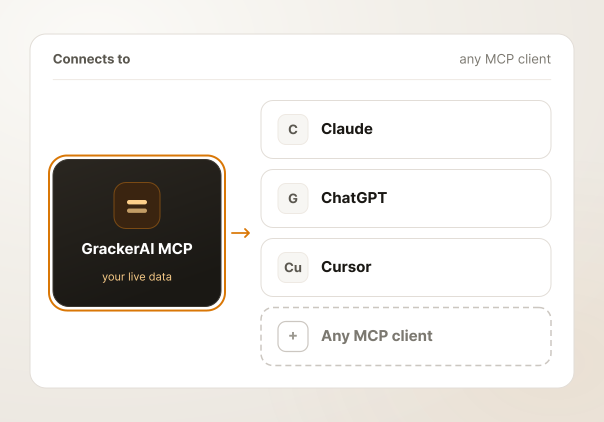
One server, every assistant

Built on a standard, so it works wherever you work

Because MCP is an open standard and not a private integration, a single server works with every compatible assistant. Connect it to Claude, to ChatGPT, to Cursor, to whatever your team has settled on, and the same live data shows up in all of them.

There is nothing bespoke to build for each tool, and as new assistants adopt the protocol, GrackerAI works inside them from day one.

  • Works with any MCP-compatible assistant
  • One connection, not a separate build per tool
  • New clients that adopt MCP work immediately
Diagram showing a single GrackerAI MCP server connecting to multiple AI assistants: Claude, ChatGPT, Cursor, and other MCP-compatible clients
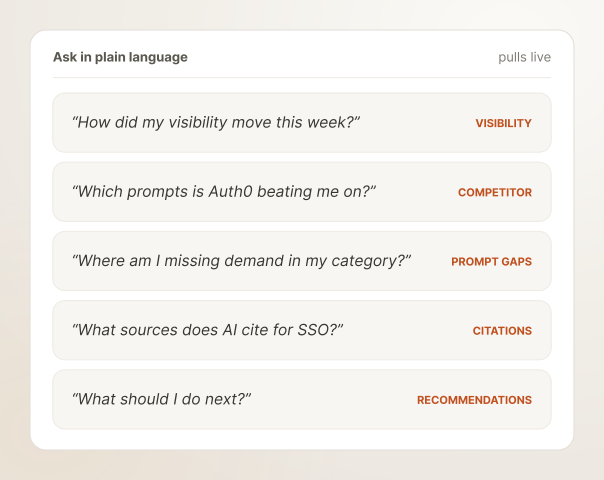
Ask anything

The whole platform, available as a question

The server exposes the parts of GrackerAI you actually ask about: your visibility score and its trend, competitor share of voice and the prompts rivals own, gaps in your prompt library, the source map behind answers, and your ranked recommendations.

You do not pick a tool or learn a syntax. You ask the way you think, and the assistant pulls the right data and answers.

  • Visibility scores and how they moved over time
  • Competitor share of voice and the prompts they own
  • Prompt gaps, citation sources and ranked recommendations
Illustration showing plain-language questions being answered with live visibility scores, competitor data and recommendations inside a chat interface
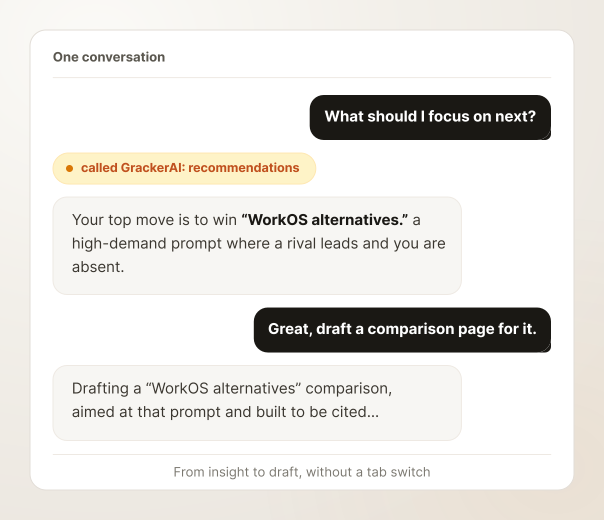
Ask, then act, in one thread

The next move is one message away

Reading the data in your assistant is only half of it. Because the insight arrives where you already work, you can act on it without leaving the conversation. Ask what to do next, get your top recommendation, then ask the assistant to start on it, all in the same thread.

Knowing and doing stop living in different tabs. The gap between seeing a gap and closing it shrinks to a single follow-up message.

  • Pull a recommendation and act on it in the same place
  • Hand findings straight to drafting or planning
  • No copying numbers between a dashboard and your work
Illustration showing a single conversation thread where a user asks about visibility data and immediately acts on recommendations without switching tabs
How it compares

A dashboard waits for you to visit. This meets you where you work.

A standalone dashboardGrackerAI MCP
You go to itIt lives in the assistant you already use
Answers prebuilt questionsAnswers whatever you ask, in plain language
One product, one loginWorks across any MCP-compatible assistant
You copy numbers out to actAct on the data in the same thread
A separate place to rememberNo context switch, no stale exports
In action

What it looks like in a normal day

Two everyday moments where asking beats opening another dashboard.

Check in mid-task

You are already in your assistant working on something else, and a question comes up

The answer is one message away, without ever leaving the thread.

  1. Ask "did my visibility move after we shipped that guide?"
  2. The assistant pulls the live score and trend from GrackerAI.
  3. Read the answer in the same chat, no tab switch.
  4. Keep working, now with the number you needed.
Brief the work

When you ask your assistant to help with content, it can ground itself in your real data first

Live visibility data, in the same conversation as the draft.

  1. Ask it to find a high-demand prompt a competitor is winning.
  2. It queries your competitor and prompt-gap data through MCP.
  3. Use that to brief a draft, aimed at the right target.
  4. All of it in one conversation, grounded in live visibility data.
"GrackerAI flipped our strategy, and prospects now arrive already knowing why we are the right fit."
+67% AI visibility
+39% business impact

David Brown, Head of Marketing, SSOJet

What it means for your team

The data you pay for, where you will actually use it.

Visibility data only helps if you look at it, and you look at it far more when it is one question away instead of one tab away. Putting GrackerAI inside your assistant turns a tool you check occasionally into one you simply ask.

Any assistant Claude, ChatGPT, Cursor, any MCP client
Live data current answers from your account, never a stale export
Plain language ask the way you think, not through filters
0 tab switches insight and the next action in the same thread
Works with

It surfaces the platform. Here is what it surfaces.

Recommendation Engine

Ask what to do next and the MCP server returns your ranked recommendations, ready to act on.

See Recommendation Engine

Integrations

Connect the rest of your stack, from Search Console to Slack, alongside the MCP server.

See Integrations

AI Monitoring

The visibility data your assistant pulls comes from monitoring across all eight engines.

See AI Monitoring

AI Search is evolving every day. Don't get left behind.

Discover your AI visibility gaps and start capturing millions of new product discovery clicks.

Partnered with
  • Microsoft
  • Google
  • Amazon AWS
  • Cloudflare
  • Nvidia
Powered by
  • Google Gemini
  • Open AI
  • Claude